Introduction
AI agents used to be chatbots. Ask a question, get an answer, done. That era is over.
Today's agents write and execute code, call internal APIs, move data between systems, and increasingly make deployment or purchasing decisions with minimal human review.
52% of surveyed executives now report their organizations are deploying AI agents in production, according to Google Cloud's 2025 research.
The old security playbook doesn't hold up here. Bolting an MFA prompt or a firewall rule onto an agent falls far short of real zero trust. Real zero trust for AI agents means treating every identity, input, and requested action as unverified by default, continuously, not just once at login.
This guide covers exactly how to apply zero trust to agents: a five-step framework, when you actually need it, the variables that determine whether it works, and the mistakes that undermine the whole model.
TL;DR
- Zero trust never trusts identity, input, or action by default; every tool call is verified continuously
- Four pillars make it work: verified identity, least-privilege access, execution isolation, and continuous monitoring
- Zero trust contains the blast radius of one compromised agent without stripping away its autonomy
- Most failures trace back to over-permissioned tools and skipped adversarial testing rather than flawed architecture
- Agent behavior shifts with every model or prompt update, requiring ongoing re-validation instead of a one-time setup
How to Secure AI Agents Using Zero Trust
Step 1: Establish a Verified Identity for Every Agent
Most agent deployments start with a shortcut: the agent borrows a developer's API key or inherits a service account's full permission set. That's precisely what zero trust standards warn against: NIST's zero trust architecture framework treats software agents as subjects that must be independently identified and authorized, not trusted extensions of whoever built them (NIST SP 800-207).
Do this instead:
- Provision a dedicated identity per agent. Register it in your identity provider the same way you'd register a service account, with attributes for role, owner, and permitted scope.
- Tie scope to the agent's job, not convenience. A customer-support agent shouldn't share an identity with one that has write access to production data.
- Issue short-lived, auto-rotating credentials. Static API keys sitting in code (or worse, embedded in a prompt template) are a standing liability that outlives their usefulness.
A compromised identity with a five-minute lifespan is a very different incident than one with a permanent key sitting in a config file.
Step 2: Enforce Least-Privilege, Just-in-Time Access to Tools and Data
An agent's tool list is its attack surface. Every API, database connection, or file path it can reach is something an attacker can reach too, if they hijack its reasoning.
- Map every tool and data source an agent can touch, then strip access down to exactly what a specific task requires.
- Grant permissions just-in-time, per task or session, instead of pre-loading a broad toolset "in case it's needed."
- Route every tool call through a centralized policy gateway rather than letting the agent's own judgment decide whether an action is allowed.
This is the gap between an agent that can check a customer's order status and one that can also cancel it, refund it, and email the customer, because nobody scoped the toolset down after the demo.
Step 3: Isolate and Segment Agent Execution Environments
Even a perfectly scoped agent needs a contained place to run. If its execution environment can reach the host machine, other agents, or unrelated systems, a single jailbreak can cascade fast.
- Run each agent or session in its own sandboxed, disposable environment, such as a container or microVM, so it starts clean and can't persist access between sessions.
- Apply network microsegmentation. Allow-list only the specific endpoints a task requires and block everything else outbound. An agent that only needs a weather API has no business reaching an internal admin panel.
- Treat inter-agent communication as untrusted input. In multi-agent pipelines, one agent's output becomes another's instruction. Verify it independently before it triggers a downstream action.
This layer catches what identity and permission controls miss: the moment an agent is coerced into misusing access it legitimately holds.
Step 4: Continuously Verify Every Action Before Execution
Login-time verification isn't enough. An agent authenticated an hour ago can still be manipulated into requesting something it shouldn't, five steps into a task.
- Apply policy checks at the moment of action, verifying actor identity, requested action, target resource, and risk level every time.
- Require step-up authentication or human approval for high-impact actions specifically: financial transactions, deletions, production deploys. Everything else moves at machine speed.
- Separate proposal from execution. Let the agent suggest an action, but have an independent policy engine authorize it.
Even strong model-level defenses aren't sufficient alone. Anthropic's own testing found a roughly 1% attack success rate against prompt injection in browser-agent evaluations, and the company was explicit that this residual rate still matters at scale. Infrastructure-level checks are what catch what gets past the model.
Step 5: Monitor, Log, and Continuously Validate the Whole System
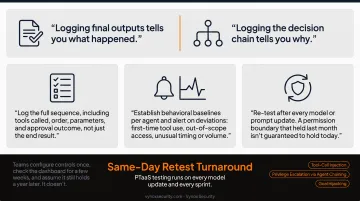
Logging final outputs tells you what happened. Logging the decision chain tells you why.
- Log the full sequence, including tools called, order, parameters, and approval outcome, not just the end result.
- Establish behavioral baselines per agent and alert on deviations: first-time tool use, out-of-scope access, unusual timing or volume.
- Re-test after every model or prompt update. A permission boundary that held last month isn't guaranteed to hold today.
This is where many teams fall short: they configure controls once, check the dashboard for a few weeks, and assume it still holds a year later. It doesn't.
That gap is why we built Vynox Security's PTaaS cadence around development cycles instead of an annual audit: testing runs on every model update and every sprint, with same-day retest turnaround once a fix ships to staging.
Our AI Red Teaming engagements target agentic workflows specifically, including tool-call injection, privilege escalation through agent chaining, and goal hijacking, confirming that permission boundaries and prompt injection defenses hold up against real pressure rather than just looking correct on paper.
When to Apply Zero Trust & What You Need Before Implementation
When Zero Trust Makes Sense for Your AI Agents
Zero trust becomes essential the moment an agent can take real action, such as writing to a database, executing code, or moving money, rather than just generating text for a human to review.
It's especially critical when agents touch:
- Regulated data, such as healthcare records, financial information, or other PII
- Elevated permissions, including anything running with service-account-level access
- Autonomous multi-step tasks, where one decision feeds the next without a human checkpoint
Narrow, read-only, single-purpose agents, like a chatbot answering FAQs from a static document, need a lighter touch initially. But "lighter" doesn't mean "none." Even read-only agents should be evaluated against the OWASP LLM Top 10, since prompt injection and data disclosure risks don't disappear just because an agent can't write anything.
What You Need Before Implementation
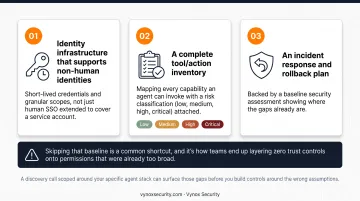
Before layering zero trust controls onto an existing deployment, three things need to already be in place:
- Identity infrastructure that supports non-human identities: short-lived credentials and granular scopes, not just human SSO extended to cover a service account.
- A complete tool/action inventory, mapping every capability an agent can invoke with a risk classification (low, medium, high, critical) attached.
- An incident response and rollback plan, backed by a baseline security assessment showing where the gaps already are.
Skipping that baseline is a common shortcut, and it's how teams end up layering zero trust controls onto permissions that were already too broad. A discovery call scoped around your specific agent stack can surface those gaps before you build controls around the wrong assumptions.
Key Parameters That Determine Zero Trust Effectiveness for AI Agents
Whether zero trust actually works for your agents comes down to how granularly you configure these four variables, not whether you checked the box.
Credential Scope & Lifetime
Broad or long-lived credentials turn one compromised agent into a full system compromise. Narrow, short-lived scopes shrink the blast radius and let you revoke access almost instantly. A service-account key with no expiry, sitting unused for months, is a bigger risk than most teams realize.
Tool/Action Granularity
Coarse permissions, like a blanket "database access" grant, hide dangerous capability inside a broad label. Fine-grained, per-operation permissions (read this table, not write to any table) directly reduce what an attacker can do if they take over.
Approval Threshold Calibration
Set the threshold too loose, and risky actions auto-execute without review. Set it too strict, and your team starts bypassing the system just to get work done. Well-calibrated, risk-tiered thresholds let security and usability coexist.
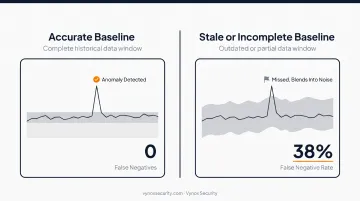
Monitoring Baseline Accuracy
Anomaly detection is only as reliable as the "normal" it's measured against. A stale or incomplete baseline lets real attacks blend into the noise as false negatives, undermining the entire monitoring system.
Common Mistakes, Troubleshooting & Alternative Approaches
Common Mistakes When Applying Zero Trust to AI Agents
- Treating it as a one-time project. Zero trust for agents is an ongoing, per-action discipline, not a firewall rule you configure once and forget.
- Granting standing, broad credentials "to avoid friction." This defeats least-privilege before it even starts.
- Relying solely on permission prompts. "Allow this action?" pop-ups don't scale, and they train users to click "allow" reflexively.
- Skipping adversarial testing after updates. A configuration that worked last quarter isn't guaranteed to hold after a prompt change or model version bump.
Troubleshooting Common Rollout Issues
| Problem | Likely Cause | Fix |
|---|---|---|
| Agents get blocked on legitimate tasks | Overly conservative initial scoping | Review denied-action logs; expand scope incrementally per verified pattern |
| Anomaly alerts are too noisy to act on | Baseline built on too little historical data | Extend the observation window before enforcing strict alerting |
| Controls slow agents down unacceptably | Policy checks running synchronously for low-risk actions | Confirm risk-tiering separates auto-approved from verify-required actions |
Alternatives and Complementary Approaches
Zero trust isn't the only lever available. It pairs well with two complementary approaches.
Human-in-the-loop-only approval workflows work well when agent volume is genuinely low and manual review isn't a bottleneck, though this doesn't scale and offers zero protection between approvals.
Model-alignment-first oversight — behavior-level monitoring of an agent's internal reasoning — suits organizations running highly capable internal models that need supervision beyond infrastructure controls. It requires real investment in AI supervision tooling and doesn't replace infrastructure-level zero trust.
Neither approach substitutes for identity, isolation, and monitoring at the infrastructure layer. They're additions, not shortcuts around the architecture.
Conclusion
Zero trust works for AI agents only when identity, least-privilege access, isolation, and monitoring operate together, not as separate fixes bolted on at different times by different teams.
Most failures don't come from bad architecture. They come from static, one-time configuration in a system that changes every time a model or prompt gets updated. An agent's behavior today isn't guaranteed to be its behavior next week.
As agents gain more autonomy (added tools, standing access, and decisions made without a human in the loop), pairing zero trust architecture with regular adversarial testing keeps the controls honest.
That's the gap Vynox Security's AI Red Teaming and PTaaS engagements are built to close. They confirm permission boundaries and prompt injection defenses still hold after every update, not just at launch.
Frequently Asked Questions
What is zero trust for AI agents?
It means never trusting an agent's identity, input, or requested action by default. Every tool call and decision gets verified continuously, not just once at login.
How is securing AI agents different from traditional zero trust network security?
Traditional zero trust was built for predictable request-response traffic between known systems. AI agents make autonomous, dynamic decisions and chain multi-step actions, which requires verification at each step.
Do AI agents need their own separate identities?
Yes. Agents should have dedicated, scoped, non-human identities rather than inheriting a developer's or service account's full permissions. This keeps a compromised agent from exposing everything that identity could touch.
Can zero trust fully stop prompt injection attacks?
No. Zero trust limits what a hijacked agent can access or do. That reduces the blast radius, but it still needs to be paired with input validation and ongoing adversarial testing.
How often should zero trust controls for AI agents be tested or re-verified?
Re-test after every material change to prompts, tools, models, or permissions, plus on a recurring cadence regardless of whether anything visibly changed.
Is human-in-the-loop approval the same thing as zero trust?
No. Approval prompts are a UX pattern, not a full security architecture. They don't replace infrastructure-level identity, isolation, and monitoring controls.