Security teams face this decision constantly: black box, white box, or grey box? Each comes with different trade-offs in cost, time, and how deep the testers can actually dig.
Grey box penetration testing sits in the middle, and it's often the most practical choice for organizations with complex applications, insider threat concerns, or compliance deadlines. This guide breaks down what it is, how it compares to black and white box testing, what the process looks like step by step, and why it matters even more now that AI systems have entered the picture.
Key Takeaways
- Grey box testing gives testers partial system knowledge, mimicking an attacker with stolen credentials or insider access.
- Combines black box speed with white box depth at lower cost than either extreme alone.
- Suits complex apps, third-party integrations, insider-threat scenarios, and SOC 2 or ISO 27001 prep.
- AI systems (LLMs, RAG pipelines, agents) need grey box methods most traditional firms still don't offer.
What Is Grey Box Penetration Testing?
Grey box penetration testing is a hybrid approach. Testers get partial knowledge of the target system, such as architecture diagrams, a standard user account, or API documentation, but not everything.
NIST's definition of gray box testing describes it as an approach assuming "some knowledge" of internal structure and implementation details, sitting between the zero-knowledge black box model and the full-visibility white box model. It is a recognized methodology with a specific purpose, not an informal label for "something in between."
The real-world scenario it simulates: an attacker who's already gained a foothold. Maybe they phished a low-level employee's credentials. Maybe they found an exposed API endpoint during reconnaissance. Either way, they're not starting from zero, but they don't have your entire codebase either.
That matches how most real breaches unfold—and a few traits set grey box testing apart from black box and white box work:
- No full source code or complete internal documentation (those belong in white box testing)
- Partial context so testers can prioritize high-risk components instead of probing the entire attack surface blindly
- Broad applicability across internal networks, web and mobile apps, APIs, cloud infrastructure, and AI systems
- Flexible vantage point from inside or outside the network perimeter, depending on scope
The efficiency gain here is real. When a tester knows where the sensitive data lives or which endpoints handle authentication, they spend less time mapping and more time actually attacking.
Grey Box vs. Black Box vs. White Box Testing
Grey box testing sits between two better-known approaches: black box and white box.
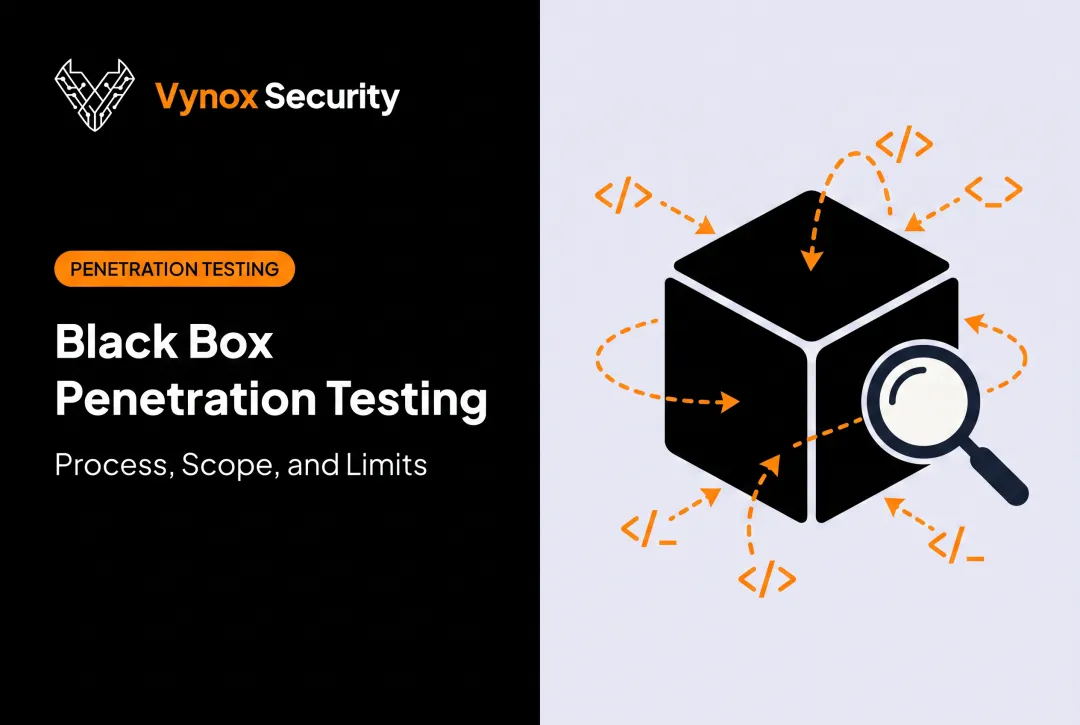
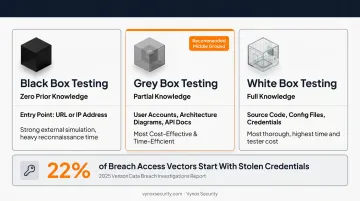
Black box testing gives testers zero prior knowledge. They start with a URL or IP address, the same entry point a real external attacker would have. That makes it a strong simulation of an outside threat, but testers often spend significant time on reconnaissance before reaching the interesting parts of the system.
Grey box testing gives testers partial knowledge: user accounts, architecture diagrams, or API docs, but not full source code. That middle ground lets them test authenticated and unauthenticated paths the way a semi-informed attacker would, without a full code audit.
White box testing hands testers everything: source code, architecture documents, configuration files, and credentials. NIST's technical guide frames white box application testing as direct source-code analysis. It's the most thorough option, but that thoroughness comes at a cost in both time and tester hours.
Here's how the three stack up:
| Dimension | Black Box | Grey Box | White Box |
|---|---|---|---|
| Knowledge level | None | Partial (accounts, diagrams, docs) | Full (source code, configs, credentials) |
| Tester perspective | Outside attacker | Semi-informed insider/attacker | Full insider |
| Focus area | Perimeter, executable behavior | Authenticated + unauthenticated paths | Code-level logic, configuration |
| Typical depth of coverage | Broad but shallow | Targeted and efficient | Exhaustive |
| Best-fit use case | Testing real-world exposure | Complex apps, compliance, insider risk | High-assurance, regulated, critical systems |
Why grey box mirrors real attacks so closely: the 2025 Verizon Data Breach Investigations Report found stolen credentials accounted for 22% of breach access vectors. Add in insider access and social engineering, and a large share of real-world breaches start exactly where grey box testing begins: with partial, unauthorized access rather than a blank slate.
It's the most cost-effective and time-efficient of the three approaches. It skips the blind spots of black box testing and the exhaustive grind of a full white box audit.
When Should You Choose Grey Box Testing?
Grey box testing isn't the right fit for every engagement, but it's often the sweet spot for a few clear scenarios.
Consider it if you're:
- Building complex applications with multiple user roles, permission tiers, or interdependent modules
- Simulating insider threats, since grey box testing mirrors what a malicious or compromised employee could access
- Integrating third-party services or APIs, where partial knowledge of the integration points helps testers focus on the highest-risk connections
- Running cloud infrastructure in shared environments, where tenant isolation and access boundaries need validation
- Working with limited time or budget but still want more depth than a black box engagement provides
Compliance is another major driver. Organizations preparing for SOC 2, ISO 27001, or similar audits often choose grey box testing because it balances realistic attack simulation with efficient, well-scoped coverage. You get depth on the systems auditors care about—without the time a full white box review demands.
The Grey Box Penetration Testing Process
A grey box engagement generally moves through five stages: define scope, share selective knowledge, map systems and design test cases, execute tests, then verify results through retesting.
Step 1: Define Testing Objectives and Scope
Testers and clients agree upfront on what's in scope. Typical decisions cover:
- Which applications, network segments, or AI components are fair game
- Which assets need the most protection
- Whether the engagement must also satisfy a compliance requirement
This step sets the boundaries everything else builds on.
Step 2: Determine What Knowledge and Access to Share
Clients typically hand over a defined slice of information: a low-privilege user account, a network diagram, or API documentation. Enough to simulate a semi-informed attacker, without granting full visibility into the system's internals.
Step 3: Map Systems and Identify Test Cases
Testers perform threat modeling to find entry points, trust boundaries, and critical assets. From there, they design test cases covering both normal user behavior and deliberately malicious activity paths.
Step 4: Execute Tests Using Manual and Automated Techniques
This is where the actual testing happens. Common techniques include:
- Matrix-based authorization testing — checking role permissions against protected resources
- Regression testing — confirming new code hasn't reopened old holes
- Combinatorial or orthogonal array testing — covering input combinations efficiently
Testers blend automated scanning with hands-on manual exploitation, since automation alone rarely catches logic flaws.
Step 5: Verify Results, Report Findings, and Retest
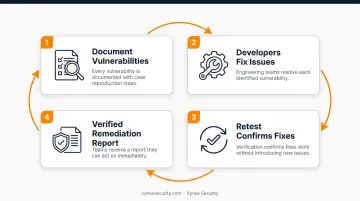
Testers document every vulnerability with clear reproduction steps. Developers fix the issues. A retest confirms the fixes work and that they didn't introduce new problems along the way. Done well, this loop leaves you with verified remediations and a report teams can act on immediately.
Benefits and Limitations of Grey Box Testing
Key Benefits
Grey box testing balances depth with practical constraints:
- Requires less internal access than white box testing when full source code sharing isn't feasible
- Combines black box's external attacker view with targeted internal insight from white box methods
- Traces data flows, input validation, and interface security without needing every line of code
Key Limitations
Trade-offs still apply:
- Partial knowledge leaves blind spots: issues outside the shared scope can slip through a full white box audit would likely catch
- Tester skill matters more: limited information demands strong technical judgment, not just tool output
- Weak scoping wastes time: unclear objectives pull testers into low-priority areas instead of critical paths
Grey Box Testing for AI Systems: The New Attack Surface
Traditional grey box methodologies were built for networks, web apps, and APIs. LLMs, RAG pipelines, and autonomous agents introduce an entirely new category of partial-knowledge scenarios that most pentest firms simply aren't equipped to test.
Think about what "partial knowledge" means for an AI system: a tester might know the system prompt structure or which documents feed a RAG pipeline, without access to the underlying model weights. That's grey box testing, just applied to a stack most firms have never assessed.
The OWASP Top 10 for LLM Applications 2026 lays out exactly where this partial-knowledge testing needs to focus: prompt injection, sensitive information disclosure, excessive agency, data and model poisoning, and vector or embedding weaknesses, among others.
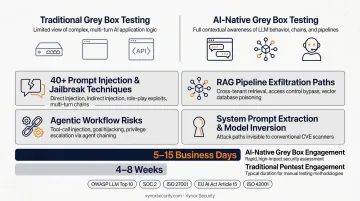
Vynox Security applies grey box methods to that AI stack—partial knowledge of prompts, data sources, and architecture, without model weights or full internals. An AI-native grey box engagement typically covers:
- 40+ prompt injection and jailbreak techniques, including direct injection, indirect injection through documents, role-play exploits, and multi-turn attack chains
- RAG pipeline exfiltration paths, such as cross-tenant retrieval, access control bypass, and vector database poisoning
- Agentic workflow risks, including tool-call injection, goal hijacking, and privilege escalation via agent chaining
- System prompt extraction and model inversion, attack paths that stay completely invisible to conventional CVE scanners
Every AI engagement maps findings to the full OWASP LLM Top 10 and ties results to SOC 2 and ISO 27001 AI-specific control evidence, plus EU AI Act Article 15 adversarial testing and ISO 42001 requirements.
Most engagements finish in 5 to 15 business days with developer-ready remediation guidance—not a generic findings dump. That cadence fits teams shipping AI features on a sprint cycle, versus the 4–8 weeks common at traditional firms.
Frequently Asked Questions
What is a grey box penetration test?
A grey box penetration test gives the tester partial knowledge of the target—such as a user account or architecture diagram. It simulates an attacker with limited insider access, not a full outsider or a full insider.
What is the difference between grey box and black box testing?
Black box testing gives testers zero prior knowledge, purely simulating an external attacker starting from scratch. Grey box testing provides partial information upfront, allowing for more focused and efficient testing of high-risk areas.
What is the difference between white box and grey box penetration testing?
White box testing grants full access to source code, architecture, and credentials for the deepest possible analysis. Grey box testing uses limited knowledge instead, trading some depth for faster, lower-cost engagements.
How much does grey box penetration testing typically cost?
Grey box testing usually costs less than white box work because scope and time are smaller, while still going deeper than black box testing. Final pricing depends on system complexity and how the engagement is scoped.
How long does a grey box penetration test take?
Most grey box engagements finish in about 5 to 15 business days, depending on scope and system complexity. Providers like Vynox typically deliver within that window for standard assessments.
Is grey box testing suitable for AI and LLM systems?
Yes. Testers can work from partial context—such as prompt structures or RAG data sources—without full model access. Vynox applies grey box methods to LLM- and RAG-specific risks, including prompt injection, jailbreaks, and related AI attack paths.