Introduction
95% of Fortune 500 companies run workloads on Azure — and that scale creates an enormous attack surface that many organizations aren't equipped to monitor continuously.
The problem isn't Azure itself. It's the gap between how fast teams deploy resources and how slowly security controls catch up. According to the 2024 Thales Cloud Security Study summarized by the Cloud Security Alliance, 31% of cloud breaches were attributed to misconfiguration or human error — issues that a structured security review would have caught before attackers did.
Organizations migrate to Azure quickly but rarely establish a structured view of their actual security posture. The gaps that go undetected until a breach or audit are usually the same ones:
Organizations migrate to Azure quickly but rarely establish a structured view of their actual security posture. The gaps that go undetected until a breach or audit are usually the same ones:
- IAM misconfigurations granting excessive permissions
- Unencrypted storage exposed to unintended access
- Overly permissive network rules left open from dev environments
- Missing or incomplete logging that leaves activity unmonitored
This guide covers what an Azure security assessment is, which domains it evaluates, how to run one step by step, and how to turn findings into a prioritized remediation roadmap.
Key Takeaways
- An Azure security assessment covers identity, network, data, configuration, and compliance across your full cloud environment
- The Azure Shared Responsibility Model defines Microsoft's scope; assessments cover only what customers are accountable for
- A quality assessment produces risk-rated findings, a compliance gap scorecard, and a prioritized remediation roadmap
- Key triggers include cloud migrations, pre-audit periods, security incidents, and periodic cadence reviews
- AI workloads on Azure introduce additional risk layers that standard assessments often miss
What Is an Azure Security Assessment?
An Azure security assessment is a systematic, multi-layered review of an organization's Azure cloud environment. It covers security configurations, IAM roles, access controls, encryption standards, network posture, and compliance alignment across the full environment — not just individual resources.
This is not a vulnerability scan. A scan identifies known CVEs on specific hosts. An assessment evaluates how your entire environment is configured, governed, and defended.
The Shared Responsibility Model
Microsoft secures the underlying infrastructure: physical data centers, network fabric, and virtualization. Everything organizations deploy on top of that is their responsibility. That includes virtual machines, application code, data, access policies, and configurations.
According to Microsoft's shared responsibility documentation, customer responsibilities remain constant across all service models (IaaS, PaaS, SaaS): data, endpoints, accounts, identities, and access management always belong to the customer. Most security failures happen on this side of the boundary.
Three Primary Goals
- Identify vulnerabilities and misconfigurations across the environment
- Validate that existing security controls are effective — not just present
- Evaluate compliance posture against required frameworks such as SOC 2, ISO 27001, HIPAA, or NIST SP 800-53
What Triggers the Need
Rapid Azure adoption without structured security review creates configuration drift — settings that were secure at deployment gradually become insecure as teams modify resources, add new services, and change access policies without coordinated oversight. Nobody notices until an incident or audit forces the issue.
That gap between what you think is secured and what actually is secured is exactly what an assessment is designed to surface.
Key Areas Covered in an Azure Security Assessment
A thorough Azure security assessment spans multiple domains simultaneously. Each addresses a distinct category of risk.
Identity and Access Management (IAM)
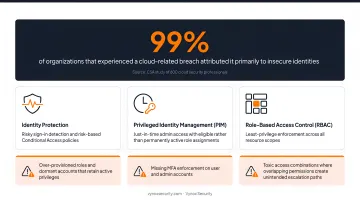
IAM is consistently the highest-risk area in Azure environments. A CSA study of 600 cloud security professionals found that 99% of organizations that experienced a cloud-related breach attributed it primarily to insecure identities.
The assessment reviews Microsoft Entra ID (formerly Azure Active Directory) configuration, including:
- Identity Protection: risky sign-in detection and risk-based Conditional Access policies
- Privileged Identity Management (PIM): just-in-time admin access with eligible rather than permanently active role assignments
- Role-Based Access Control (RBAC): least-privilege enforcement across all resource scopes
Common red flags include:
- Over-provisioned roles and dormant accounts that retain active privileges
- Missing MFA enforcement on user and admin accounts
- Toxic access combinations where overlapping permissions create unintended escalation paths
Network Security
Network evaluation covers how traffic flows into, out of, and within the Azure environment:
- Network Security Group (NSG) rule review — inbound and outbound allow/deny configurations
- Virtual Network (VNet) segmentation and peering configurations
- Azure Firewall policies and rule collections
- Open port exposure and public-facing service endpoints
- Private endpoint usage and traffic filtering policies
This identifies paths attackers could use to move laterally or access resources without authorization.
Data Security
Data security evaluation examines:
- Encryption at rest (AES-256) and in transit (TLS 1.2+)
- Data classification practices and access control policies on storage accounts
- Azure Key Vault usage for secrets, encryption keys, and certificate management
- Whether Data Loss Prevention (DLP) policies are in place through Microsoft Purview
- Storage account permissions and whether sensitive data is inadvertently publicly accessible
Configuration and Governance
Misconfiguration remains one of the most exploited vulnerability categories in cloud environments — the same 2024 Thales study attributed 31% of cloud breaches to it. The configuration assessment domain evaluates:
- Azure Policy assignments and initiative scopes
- Resource tagging standards and region controls
- Governance guardrails that prevent insecure deployments (Deny, Audit, and DeployIfNotExists policy effects)
- Whether publicly accessible Blob Storage or permissive IAM policies exist
Logging, Monitoring, and SIEM Integration
Assessors check whether the organization would actually detect an attack in progress:
- Diagnostic logging enabled across Azure resources
- Log flow into a centralized Log Analytics workspace
- Microsoft Sentinel or equivalent SIEM integration for real-time threat detection
- Incident response workflows and alerting configuration
Missing or misconfigured logging creates blind spots. Mandiant's M-Trends 2025 report found that global median attacker dwell time rose to 14 days. Organizations without centralized logging are unlikely to catch intrusions in that window.
Compliance Mapping
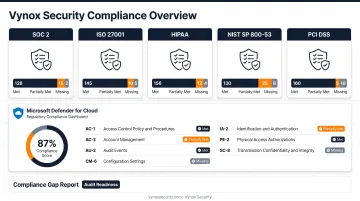
The assessment evaluates alignment with specific frameworks — SOC 2, ISO 27001, HIPAA, NIST SP 800-53, PCI DSS — and produces a compliance gap report showing which controls are met, partially met, or missing. Microsoft Defender for Cloud's regulatory compliance dashboard supports this directly, mapping assessed resources against these framework controls. This output directly supports audit readiness.
How to Conduct an Azure Security Assessment
An Azure security assessment follows a structured process whether conducted internally or by an external security team. Cutting corners on any phase reduces the value of the output.
Step 1: Define Scope and Objectives
Start with documented goals. Is the primary aim vulnerability discovery, compliance preparation, or security posture baselining? Then define what's in scope:
- Which Azure subscriptions, resource groups, and regions
- Which application types and workloads
- Explicitly listed out-of-scope resources to avoid ambiguity during review
Step 2: Inventory Resources and Gather Documentation
Collect before testing begins:
- Full Azure resource inventory (VMs, storage accounts, databases, networking, App Services)
- Existing security policies and prior audit reports
- Network architecture diagrams
- List of applicable regulatory requirements
Step 3: Engage Stakeholders and Form the Assessment Team
Effective assessments require cross-functional participation from IT, security, compliance, and business units. The internal vs. external decision matters:
- Internal teams move faster but may lack independence and miss context-blind risks
- Third-party assessors bring an attacker's perspective and unbiased findings
For teams without dedicated in-house cloud security expertise, Vynox Security conducts Azure assessments with active exploitation validation, developer-ready reporting, and compliance mapping to SOC 2, ISO 27001, and PCI DSS — typically delivered within 5–15 business days.
Step 4: Execute the Assessment
The execution phase combines automated and manual review:
- Microsoft Defender for Cloud for Cloud Security Posture Management (CSPM) findings and Secure Score
- CIS Microsoft Azure Foundations Benchmark v6.0.0 checks
- IAM configuration review and privilege escalation path mapping
- Network exposure testing and data security settings evaluation
- Manual penetration testing of exposed services
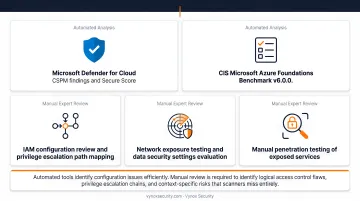
Automated tools identify configuration issues efficiently. Manual review is required to identify logical access control flaws, privilege escalation chains, and context-specific risks that scanners miss entirely.
Step 5: Document Findings with Risk Ratings
Document all identified issues with:
- CVSS severity ratings (Critical, High, Medium, Low)
- Clear evidence and reproduction steps
- Initial remediation recommendations
This documentation becomes the foundation for the remediation phase and compliance reporting.
Analyzing Results and Driving Remediation
Interpreting the Findings
Review the full report for patterns — recurring issues across multiple resources typically signal systemic governance gaps, not isolated misconfigurations. Common examples include:
- Widespread missing MFA across user and service accounts
- Consistently permissive NSG rules allowing broad inbound access
- Storage accounts with public access enabled across environments
Share findings with security leadership, DevOps leads, and compliance officers, translating business impact into non-technical terms where needed.
Building the Remediation Roadmap
Structure remediation by priority:
- Critical and High findings — exposed sensitive data, unauthenticated access paths, privilege escalation routes
- Medium findings — controls that are present but misconfigured
- Low findings — hardening improvements and compliance alignment gaps
Each item in the roadmap should include the responsible team, specific technical remediation steps, and a target resolution timeline.
What a Quality Assessment Report Includes
| Component | Description |
|---|---|
| Executive summary | High-level risk overview for leadership |
| Risk-rated findings | CVSS scores, evidence screenshots, reproduction steps |
| Compliance gap scorecard | Control status against applicable frameworks |
| Prioritized remediation roadmap | Step-by-step technical fix guidance per finding |
| Retest support | Verification that fixes resolved the identified issue |
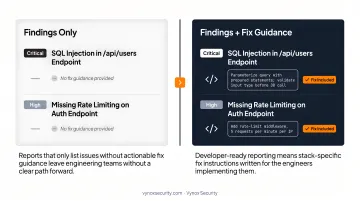
Reports that only list issues without actionable fix guidance leave engineering teams without a clear path forward. Developer-ready reporting means stack-specific fix instructions written for the engineers implementing them — concrete enough to act on the same day findings land in their queue.
When Should You Run an Azure Security Assessment?
Event-Driven Triggers
Run an assessment when:
- Before or after a major cloud migration — to ensure no security gaps were introduced during the transition
- Ahead of a compliance audit (SOC 2, ISO 27001, HIPAA) — to identify and close gaps before auditors arrive
- Following a security incident or alert — to understand root cause and prevent recurrence
- When onboarding new Azure services or significantly expanding the cloud footprint
Periodic Assessments
Event-driven assessments aren't enough. Cloud environments experience configuration drift as teams deploy and modify resources continuously. CIS Critical Security Controls v8.1 Safeguard 18.2 specifies penetration tests should be performed no less than annually — a reasonable minimum baseline for Azure security assessments as well.
Two cadences tend to fit most organizations:
- Annual assessments — minimum baseline for stable environments, satisfies most compliance requirements
- Quarterly or sprint-aligned reviews — better fit for regulated industries or teams shipping frequent infrastructure changes
AI Workloads on Azure
Organizations running AI workloads on Azure face an additional layer of risk that standard infrastructure assessments don't cover. The OWASP Top 10 for LLM Applications 2025 identifies attack surfaces including prompt injection (LLM01), sensitive information disclosure (LLM02), and excessive agency (LLM06).
These risks emerge from the AI application layer — not the cloud infrastructure layer — and require separate testing coverage.
A misconfigured storage account can expose model weights and training data. A misconfigured agent permission set can allow automated actions with unintended consequences. Covering both layers — cloud infrastructure and the AI application sitting on top of it — is what a complete Azure security assessment needs to address.
Frequently Asked Questions
What is the cloud security assessment process?
A cloud security assessment follows five stages: define scope and objectives, inventory assets and gather documentation, execute testing across identity, network, data, and compliance domains, document findings with CVSS severity ratings, and deliver a prioritized remediation roadmap with technical fix guidance per issue.
What are the 4 C's of cloud security?
The 4 C's are Cloud, Cluster, Container, and Code — a layered security model addressing each level of the cloud-native stack from underlying infrastructure down to application code. Each layer must be secured independently, as weaknesses at any level can compromise layers above it.
How often should you conduct an Azure security assessment?
At minimum annually, though organizations in regulated industries or high-change environments should run quarterly reviews or reassess after major deployments. Continuous testing aligned with development sprints provides the strongest ongoing posture assurance.
What is the Azure Shared Responsibility Model?
Microsoft secures the underlying cloud infrastructure, including physical facilities, network fabric, and virtualization. Customers are responsible for securing their data, applications, identities, and configurations. An Azure security assessment evaluates exactly the customer's side of that boundary.
What does an Azure security assessment report include?
Reports typically include risk-rated findings with evidence and reproduction steps, a compliance gap scorecard against frameworks like SOC 2, ISO 27001, and PCI DSS, and a prioritized remediation roadmap with specific technical guidance per finding.
How long does an Azure security assessment take?
Scope and complexity determine duration. A standard assessment of a mid-sized Azure environment typically completes in 5–15 business days. Engagements combining configuration review with active exploitation testing generally fall at the lower end of that range.