Many security teams are finding that playbooks built for "normal" apps don't hold up anymore. Apps now ship on-device LLMs, chat interfaces, and autonomous agents that make decisions on a user's behalf, and traditional mobile testing was never designed to catch prompt injection or model extraction.
This article breaks down what mobile application security actually means in 2026: the core components, the threats worth losing sleep over, how testing has evolved, and the practices that keep apps resilient as they ship AI features faster than ever.
Key Takeaways
- Mobile app security now covers code, APIs, data storage, and on-device AI features like LLMs and chatbots
- AI-generated phishing and deepfake spoofing outpace traditional mobile defenses
- Native, hybrid, and web apps each need distinct testing for their attack surfaces
- Manual pentesting plus sprint-aligned checks catch what scanners alone miss
- SOC 2 and ISO 27001 now expect continuous testing evidence, not annual snapshots
What Is Mobile Application Security?
Mobile application security is the practice of protecting mobile apps, along with the backend services, APIs, and data they touch, from unauthorized access, tampering, and data breaches. It covers iOS, Android, and cross-platform environments—and it goes well beyond a password screen when attackers target stored data, APIs, and backend services.
What counts as an "application" in this context? In a security assessment, a mobile application isn't just the icon on a user's home screen. It's any front-end software, whether native, hybrid, or web-based, that interacts with backend systems and device hardware.
The UI, local storage, API calls, and hardware sensors are all potential attack surfaces.
Scale is part of why this matters. Apple's App Store averaged more than 850 million weekly active users across 175 countries and regions in 2025. That's a single storefront. Add Android's global footprint, and financial, health, and personal data move through apps at massive scale every second.
Mobile apps aren't standalone anymore, either. Many now embed:
- On-device or cloud-connected LLMs for chat and support features
- Autonomous agents that complete tasks like booking or scheduling without step-by-step input
- RAG pipelines pulling answers from private knowledge bases
Each of these expands what "mobile security" has to cover. A chatbot with a poorly protected system prompt is a mobile app vulnerability now, not just an AI vulnerability.
Mobile app security vs. mobile device security: these terms get used interchangeably, but they aren't the same.
- Device security covers the phone itself: OS patches, MDM policies, remote wipe
- App security covers the software layer: code, data handling, and communications inside a specific app
This article focuses on the app and software layer, since that's where most breaches actually originate.
Main Types of Mobile Applications and Their Unique Security Needs
Mobile apps do not share one attack surface. How you build the app shapes what you need to protect and what attackers will target first.
Common types include:
- Native: compiled for iOS or Android only
- Hybrid: native shell around web content
- Mobile web: runs entirely in the browser
- PWAs: installable, offline-capable web apps
Native Apps
Native apps get direct access to device hardware and OS-level controls like the iOS Keychain or Android Keystore. That enables strong, hardware-backed protections.
The tradeoff is the distributed binary. Attackers routinely decompile native apps to extract API keys, business logic, or hardcoded credentials. Security work centers on binary protection, secure key storage, and keeping secrets off the client.
Hybrid and Cross-Platform Apps
Frameworks like React Native and Flutter ship one codebase to iOS and Android. Efficient for development, but a single flaw in shared logic can hit both platforms at once.
Classic hybrid apps (a WebView inside a native container) inherit native and web attack surfaces together. Test both the container and the embedded web layer. Treat shared modules as high-impact, since one bug multiplies across every build you ship.
Mobile Web and Progressive Web Apps
Web-based mobile apps skip the app store and run in the browser. They pick up classic web issues such as insecure APIs and weak session handling, on top of mobile-specific risks.
PWAs add offline caching and installability. That brings service-worker and local-storage exposure you should review on their own.
Core Components of Mobile Application Security
Mobile app security is a stack of controls, not a single feature. Each layer below covers a different failure mode—and skipping one often undoes the rest.
Authentication and Access Control
Weak login flows are still the easiest way into a mobile app. Solid implementations combine several controls:
- Multi-factor authentication that goes beyond SMS codes
- Biometric checks tied to hardware-backed secure enclaves
- OAuth 2.0 for delegated access
- JWT for stateless sessions
- Role-based access control so users only reach what their role permits
Get a JWT that never expires or an OAuth flow missing PKCE, and everything downstream matters less.
Data Encryption and Secure Storage
Data needs protection in two states: at rest and in transit. On-device, that means using the Android Keystore or iOS Keychain rather than plaintext files. In transit, it means TLS (HTTPS) on every network call, no exceptions. Weak or outdated encryption remains one of the most common root causes behind mobile breaches—often because a team secured the login screen and forgot the analytics payload.
Secure Communication and API Protection
Most mobile apps are really a thin client talking to a backend API, which makes that channel a prime target. Baseline protections include:
- Enforcing HTTPS everywhere, with no fallback to plain HTTP
- Certificate pinning, so the app only trusts its own backend's certificate
- Strong API authentication (tokens, mutual TLS) instead of relying on obscurity
Without certificate pinning, an attacker on public Wi-Fi can intercept traffic between app and backend without the user noticing anything.
App Permissions and Secure Coding Practices
Every camera, location, or contacts permission an app requests becomes a liability if the app itself gets compromised. The principle of least privilege applies: request only what a feature genuinely needs, and ask again later rather than front-loading permissions at install. Pair that with input validation, sanitized outputs, and disciplined dependency management, since one unpatched library can undo every other control.
Runtime Protection and Anti-Tampering
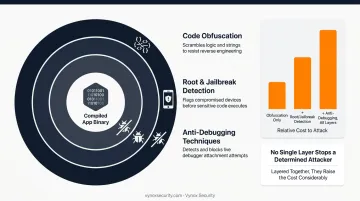
Once an app ships, the work isn't finished. Code obfuscation, root and jailbreak detection, and anti-debugging techniques make it harder for attackers to reverse-engineer the binary after deployment. None of these stop a determined attacker outright, but layered together, they raise the cost of an attack considerably.
Top Mobile App Security Threats and Risks to Watch in 2026
The fundamentals haven't disappeared. They've just been joined by newer categories of risk.
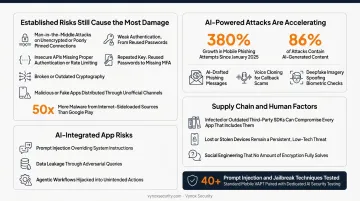
Established risks that still cause the most damage:
- Man-in-the-middle attacks on unencrypted or poorly pinned connections
- Insecure APIs missing proper authentication or rate limiting
- Weak authentication, from reused passwords to missing MFA
- Broken or outdated cryptography
- Malicious or fake apps distributed through unofficial channels
That last point is bigger than it sounds. Google has found more than 50 times as much malware coming from internet-sideloaded sources as from apps distributed on Google Play.
AI-powered attacks: Attackers now use generative AI to draft phishing messages that read like they came from a real colleague, clone voices for callback scams, and spoof biometric checks with deepfake imagery. Zimperium's research found mobile phishing attempts grew 380% since January 2025, with roughly 86% of those attacks containing AI-generated content.
AI-integrated app risks: Apps embedding on-device LLMs, chatbots, or agentic features open doors that standard mobile pentesting was never built to check:
- Prompt injection that overrides a chatbot's system instructions
- Data leakage through adversarial queries against a connected knowledge base
- Agentic workflows hijacked into unintended actions, like a booking assistant confirming something it shouldn't
Those gaps are why combined testing matters. Vynox Security pairs standard mobile VAPT (static, dynamic, and runtime analysis of the iOS or Android binary) with dedicated AI security testing covering 40+ prompt injection and jailbreak techniques. The chatbot embedded in an app gets tested as rigorously as its login screen.
Third-party SDK risks: A single infected or outdated library can compromise every app that includes it. That supply chain risk can spread across thousands of installs before anyone notices, since most teams don't audit every dependency they pull in.
Human factors: Lost or stolen devices and social engineering remain persistent, low-tech threats that no amount of encryption fully solves. A phone left in a taxi with an unlocked banking app is still a banking app breach.
Mobile App Security Testing Methods
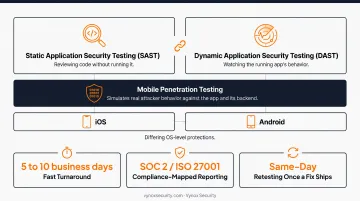
Static Application Security Testing (SAST) and Dynamic Application Security Testing (DAST) work best as a pair:
- SAST reviews the app's code or compiled binary without running it, catching hardcoded secrets and insecure logic early
- DAST evaluates the app while it runs, watching network traffic and behavior under unexpected input
A static scan might miss a runtime authentication bypass. A dynamic scan might miss a flaw buried in code that never gets triggered.
Mobile penetration testing goes further. It simulates real attacker behavior against both the app and its backend, rather than flagging patterns a scanner happens to recognize.
Because iOS and Android differ in OS-level protections and reverse-engineering tools, platform-specific testing on both is essential. A vulnerability that's a non-issue under iOS sandboxing might be wide open on Android.
Vynox Security's mobile penetration testing covers iOS and Android in a single engagement. The work combines static, dynamic, and runtime analysis (including binary reverse engineering and certificate pinning bypass) without needing source code access.
Findings arrive as developer-ready, stack-specific guidance. A Keychain misconfiguration gets a Keychain-specific fix, not a vague note to "use secure storage."
Expect these from a solid mobile testing engagement:
- Fast turnaround – most mobile engagements complete in 5 to 10 business days, not months
- Compliance-mapped reporting for SOC 2 and ISO 27001, so findings double as audit evidence
- Same-day retesting once a fix ships to staging, rather than waiting weeks for verification
If your app embeds AI features, ask whether the provider tests that layer too. A standard mobile pentest won't catch a poorly secured system prompt. You can book a scoping call to see what a combined assessment covers for your specific stack.
Best Practices to Strengthen Mobile App Security in 2026
Security holds up in production when it is built in early, tested on the same cadence as releases, and validated by people—not only scanners.
Practical habits that move the needle:
- Build security into the SDLC from day one — threat modeling in design and secure coding in development cost far less than fixing a production breach
- Test continuously, not annually — sprint-aligned testing (PTaaS) catches issues while they are cheap to fix, including a pass on every model or feature update
- Pair automated scanning with manual review — tools catch known patterns; manual mobile pentests find business-logic flaws and chained exploits attackers actually use
- Treat retesting as part of delivery — verify fixes on the same cadence you ship, not as a once-a-year afterthought
None of this is exotic. Most teams fall short on consistency, not on knowing what to do. Providers that combine mobile app VAPT with PTaaS-style cadence make that consistency easier to sustain.
Frequently Asked Questions
What is an application in mobile security?
A mobile application is any native, hybrid, or web-based software running on a device that interacts with backend systems, APIs, or hardware. Each interaction point — UI, storage, and network calls — is a distinct attack surface worth testing on its own.
What are the main types of mobile applications?
The four main types are native apps, hybrid apps, mobile web apps, and progressive web apps (PWAs). Each has a different architecture, which shifts where the biggest security risks sit, from binary tampering in native apps to session handling in web apps.
What are the OWASP Mobile Top 10 risks?
The OWASP Mobile Top 10 is an industry-standard list of the most critical mobile vulnerabilities, including improper credential usage, insecure authentication, insufficient cryptography, and inadequate supply chain security. Teams use it as a baseline for mobile testing and compliance mapping.
Is mobile app security different from web app security?
They share risks like insecure APIs and weak session handling, but mobile apps add unique concerns: local on-device data storage, granular device permissions, and binary reverse engineering that web apps don't face.
How often should mobile apps be security tested?
Test before every major release, and continuously alongside development sprints rather than once a year. Any time you add a new feature, especially an AI-powered one, it deserves its own security pass.
How much does mobile app security testing typically cost?
Pricing depends on app complexity, platform coverage, and testing depth. Transparent, stage-appropriate tiers — such as Vynox's Rapid Secure and Deep Secure — help startups and enterprises budget without guesswork.