
Introduction
Mobile apps now handle bank transfers, medical records, identity verification, and financial transactions — making them one of the highest-value targets attackers pursue. Yet many teams ship mobile products without ever validating whether the security controls actually hold up under adversarial conditions.
Mobile application penetration testing is an authorized, simulated attack against an iOS or Android app — covering its local storage, compiled binary, network traffic, and backend API integrations — to find exploitable vulnerabilities before real attackers do.
Kaspersky recorded 33.3 million mobile malware and adware attacks in 2024, including 69,000 mobile banking trojans. Separately, mobile money processed over $1.68 trillion in transactions in 2024, which means every authentication weakness and insecure storage flaw carries direct financial exposure.
That context makes structured testing a practical necessity, not a compliance checkbox. This guide covers the full picture: why mobile pentesting differs from web testing, the core methodology, the OWASP Mobile Top 10 vulnerability classes, essential tools, and what to expect from a real engagement, including deliverables.
Key Takeaways
- 95% of mobile apps in a 2023 NowSecure benchmark failed at least one OWASP MASVS security area
- Four attack surfaces web scanners miss entirely: on-device storage, compiled binaries, network traffic, and backend APIs
- The OWASP Mobile Top 10 (2024) is the standard framework for structuring and benchmarking mobile security assessments
- Automated tools surface known patterns, but business logic flaws and chained exploits require manual expert testing
- Quality engagements deliver CVSS-rated findings with developer-ready fix guidance mapped to SOC 2, ISO 27001, and PCI DSS controls
What Mobile App Penetration Testing Is and Why It Matters
Mobile app penetration testing is a structured security assessment that simulates real attacker techniques against an iOS or Android application. It covers the full attack surface: local storage, compiled binaries, network communications, API integrations, and platform-level interactions — all evaluated to identify exploitable vulnerabilities before they reach production.
How It Differs from Web App Testing
Web application scanners are designed for browser-based attack surfaces. They don't inspect:
- APK or IPA binaries and their compiled code
- Android intents, exported components, and inter-process communication
- iOS Keychain security, App Transport Security settings, and entitlements
- Local storage, device databases, and runtime anti-tamper controls
A web scanner pointed at a mobile app's API endpoint will miss the majority of mobile-specific flaws. Platform-specific manual analysis is required to assess the full attack surface.
Three Testing Approaches
| Approach | What's Provided | When It's Used |
|---|---|---|
| Black-box | No source access, external-only view | Attacker simulation, point-in-time assessment |
| Gray-box | Partial credentials, architecture context | Most common in practice; balances coverage with efficiency |
| White-box | Full source code and documentation | Most thorough; ideal for major releases or compliance gates |
Vynox's mobile pentest engagements don't require source code access. Compiled binaries are assessed through reverse engineering and runtime instrumentation, making the methodology viable for both black-box and gray-box scenarios.
The Business Case
95% of the 6,434 apps in NowSecure's 2023 benchmark failed at least one MASVS security area. The breakdown tells the story: 54% had network-related failures, 47% platform-related, and 43% code-related — none of which automated web scanners are equipped to catch.
The consequences of undetected mobile vulnerabilities are concrete:
- Regulatory fines under GDPR, HIPAA, and PCI DSS for exposed sensitive data
- Loss of customer trust after a breach involving health records or payment data
- App store removal or platform policy violations from discovered malware behavior
Compliance Alignment
Mobile pentests generate the evidence organizations need to satisfy compliance requirements. The mapping matters:
- PCI DSS v4.0.1 (Requirements 11.4.2/11.4.3) mandates penetration testing at least every 12 months for in-scope systems
- SOC 2 (TSC CC7.1, CC4.1) and ISO 27001 (Annex A 8.29) align to security testing in development and acceptance processes — a pentest provides direct evidence
- For apps handling protected health information, a mobile pentest directly supports HIPAA's periodic technical evaluation requirement under 45 CFR 164.308(a)(8)
The Mobile App Attack Surface: Android vs. iOS
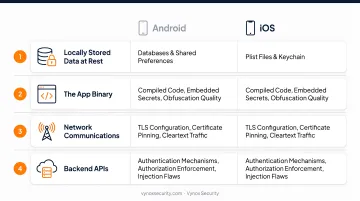
Every mobile app pentest must cover four distinct attack surfaces:
- Locally stored data at rest — databases, shared preferences, plist files, Keychain
- The app binary — compiled code, embedded secrets, obfuscation quality
- Network communications — TLS configuration, certificate pinning, cleartext traffic
- Backend APIs — authentication mechanisms, authorization enforcement, injection flaws
Android-Specific Vulnerabilities
Android's open ecosystem creates testing opportunities not present on iOS:
- Hardcoded credentials in APKs — decompiling the binary reveals API keys and secrets embedded in source
- Insecure intent handling — exported components that accept untrusted input without validation
- Exported content providers — improperly configured providers accessible to other apps without authentication
- Root detection bypasses — root checks can be circumvented at runtime; they should never be treated as a security boundary
iOS-Specific Vulnerabilities
iOS's sandboxed architecture shifts risk to different areas:
- Keychain data leakage — tokens and credentials stored with overly permissive accessibility attributes
- Insecure local storage — sensitive data written to
NSUserDefaultsor unencrypted plist files outside the Keychain - App Transport Security misconfigurations — broad exceptions like
NSAllowsArbitraryLoadsthat bypass HTTPS enforcement - Biometric bypass — improper implementation of local authentication that allows circumvention of Face ID or Touch ID checks
If your app ships on both platforms, the attack mechanics are distinct enough that a single-platform assessment leaves real gaps. Android and iOS testers work with different tooling, different runtime environments, and different vulnerability classes — findings on one platform don't transfer cleanly to the other. Vynox scopes both platforms within a single engagement, delivering unified reporting across Android and iOS rather than requiring two separate vendor relationships.
Mobile App Penetration Testing Methodology: Step-by-Step
Step 1 — Scoping and Preparation
Before any testing begins, the engagement must define:
- Platform scope: Android, iOS, or both
- User roles: Credentials for each account type (standard user, admin, premium, etc.)
- Test environment: Staging preferred over production to avoid live data exposure
- Required artifacts: APK or IPA files, API documentation, architecture context
- Legal authorization: Signed authorization documents covering the testing scope
Vynox's scoping process starts with a free 30-minute discovery call where the team maps the application architecture, identifies the highest-risk testing areas, and recommends the appropriate engagement type. Source code is not required — testing is conducted against compiled binaries.
Step 2 — Reconnaissance and Static Analysis
Static analysis (SAST) examines the application without executing it. This phase uncovers:
- Hardcoded API keys, tokens, and credentials embedded in the binary
- Insecure cryptographic implementations (weak algorithms, reused IVs, hardcoded keys)
- Overly permissive app permissions and exported component configurations
- Code obfuscation quality and anti-tampering control effectiveness
Static analysis runs in parallel with OSINT — reviewing what's already publicly exposed: app store listings, API references in developer forums, and any leaked credentials in public repositories.
Step 3 — Dynamic Analysis and Active Testing
Runtime testing is where the most impactful findings emerge. This phase includes:
- Traffic interception: Bypassing certificate pinning to capture and manipulate API communications
- Authentication testing: Probing session management, token handling, and biometric controls
- API probing: Testing authorization enforcement across endpoints, including privilege escalation attempts
- Runtime instrumentation: Hooking into live application functions to observe data handling, bypass controls, and manipulate app behavior
This is the phase where root detection and jailbreak detection bypasses are exercised — confirming whether these controls provide any real security value or are trivially circumvented.
Step 4 — Exploitation and Impact Confirmation
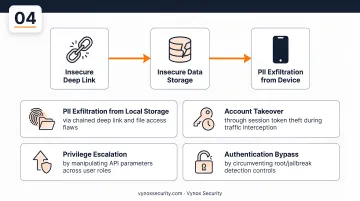
Unlike a vulnerability scan, exploitation confirms true positives and quantifies actual business risk. A tester might chain an insecure deep link with an insecure data storage vulnerability to exfiltrate PII from the device — demonstrating not just that a flaw exists, but what an attacker could accomplish with it.
Chained vulnerabilities reveal impact that reviewing each finding in isolation would miss. Common exploitation outcomes include:
- PII exfiltration from local storage via chained deep link and file access flaws
- Account takeover through session token theft during traffic interception
- Privilege escalation by manipulating API parameters across user roles
- Authentication bypass by circumventing root/jailbreak detection controls
Step 5 — Reporting and Remediation Support
A quality mobile pentest report serves two audiences at once:
For leadership:
- Executive summary with overall risk posture
- Business risk framing for each significant finding
- Compliance mapping to SOC 2, ISO 27001, and PCI DSS
For engineering teams:
- Prioritized vulnerability list with CVSS scores
- Reproduction steps and evidence screenshots for each finding
- Developer-ready, stack-specific fix guidance
Vynox delivers findings pre-mapped to SOC 2, ISO 27001, and PCI DSS controls — formatted so evidence can be handed directly to auditors without additional reformatting. A verified G2 reviewer described the output: "The final report was well-structured — executive summary, technical findings, evidence screenshots, CVSS scores, and remediation guidance all in one document."
After fixes are deployed to staging, same-day retest verification is available — a meaningful differentiator when development teams need to move quickly. One client confirmed: "The retest turnaround was impressively fast — fixes were verified the same day our engineer pushed them to staging."
Critical Vulnerability Areas: OWASP Mobile Top 10
The OWASP Mobile Top 10 (2024 Final Release) is the standard framework for mobile security testing — serving as both a testing roadmap and a measure of security maturity.
The 2024 List
| ID | Category | Core Risk |
|---|---|---|
| M1 | Improper Credential Usage | Hardcoded, exposed, or mishandled credentials |
| M2 | Inadequate Supply Chain Security | Vulnerable dependencies or compromised build pipeline |
| M3 | Insecure Authentication/Authorization | Weak identity checks or permission enforcement |
| M4 | Insufficient Input/Output Validation | Unvalidated data entering or leaving the app |
| M5 | Insecure Communication | Cleartext traffic, missing pinning, weak TLS |
| M6 | Inadequate Privacy Controls | Improper personal-data handling |
| M7 | Insufficient Binary Protections | Weak resistance to reverse engineering or tampering |
| M8 | Security Misconfiguration | Incorrect settings, permissions, or debug flags |
| M9 | Insecure Data Storage | Sensitive data stored without adequate protection |
| M10 | Insufficient Cryptography | Weak algorithms, reused IVs, hardcoded keys |

Why Automation Can't Cover This Alone
Automated tools can't resolve contextual interdependencies. Without human analysis, critical vulnerabilities get missed — not because scanners are broken, but because they have no understanding of how an app is supposed to behave.
Automated scanners miss:
- Business logic flaws — authorization bypasses that require understanding the app's intended behavior
- Chained exploits — vulnerabilities that only become critical when combined with another flaw
- IPC abuse — insecure inter-process communication requiring platform knowledge to identify and exploit
- Contextual authentication issues — session management weaknesses that depend on workflow understanding
Scanners cover breadth well, catching known patterns quickly across a codebase. Confirming real exploitability requires manual analysis — that distinction is where most automated-only assessments fall short.
Essential Tools for Mobile App Penetration Testing
Static Analysis and Reverse Engineering
| Tool | Primary Use |
|---|---|
| MobSF | Automated Android/iOS static and dynamic assessment; good for initial reconnaissance |
| jadx | Decompiles Android DEX/APK files to readable Java — reveals hardcoded secrets and logic flaws |
| APKTool | Decodes and rebuilds Android APKs; inspects resources, manifests, and smali bytecode |
| Hopper | iOS/macOS binary disassembly and decompilation — essential for analyzing compiled iOS apps |
| Ghidra | Open-source NSA binary reverse engineering framework — cross-platform binary analysis |
Dynamic Analysis and Traffic Interception
- Burp Suite — Standard proxy for intercepting and manipulating HTTPS traffic between the app and its backend APIs; supports request fuzzing and authorization testing
- Frida — Runtime instrumentation framework for function hooking, root/jailbreak detection bypass, and certificate pinning bypass on live applications
- Objection — Built on Frida; command-driven interface for runtime exploration, bypassing security controls, and extracting data from running apps
Tools identify candidates for investigation — not confirmed vulnerabilities. MobSF will flag potential insecure storage patterns, but it cannot determine whether the stored data is sensitive in a business context, or whether that finding chains into an exploitable access path. That distinction is what manual analysis provides: context, chaining, and confirmed impact rather than a raw list of signals.
What to Expect From a Mobile Pentest Engagement
Typical Engagement Flow
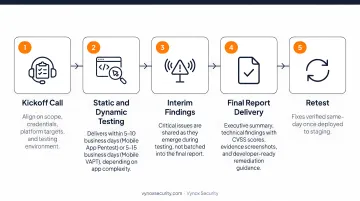
- Kickoff call — Align on scope, credentials, platform targets, and testing environment
- Static and dynamic testing — Vynox's mobile pentests typically deliver within 5–10 business days (Mobile App Pentest) or 5–15 business days (Mobile VAPT), depending on app complexity
- Interim findings — Critical issues are shared as they emerge during testing, not batched into the final report
- Final report delivery — Executive summary, technical findings with CVSS scores, evidence screenshots, and developer-ready remediation guidance
- Retest — Fixes verified same-day once deployed to staging
What Determines Cost and Timeline
No two mobile apps have the same attack surface. Scope drivers that affect both timeline and cost include:
- Platform scope: iOS only, Android only, or both platforms
- Application complexity: Number of screens, user roles, and distinct business workflows
- API coverage: Number of endpoints and authentication mechanisms
- Testing approach: Gray-box (no source required) versus white-box (source-assisted)
- Remediation retest scope: One-time verification versus continuous PTaaS cadence
How complex your app is across these dimensions directly shapes both the timeline and the right testing cadence for your team.
Organizations that ship frequently benefit from Vynox's PTaaS model: sprint-aligned mobile testing with a real-time dashboard tracking open vulnerabilities, resolved issues, and an overall security posture score. This replaces one-time point-in-time assessments with continuous visibility across every release cycle.
Pricing is scoped to the actual engagement — transparent and stage-appropriate from startup to enterprise. A free sample report is available on request to evaluate deliverable quality.
Frequently Asked Questions
How long does a mobile application penetration test take?
Most engagements run between 5–15 business days depending on app complexity, number of features and API endpoints, and whether both iOS and Android are in scope. Vynox's focused Mobile App Pentest delivers in 5–10 business days — faster than the 4–8 week timelines typical of traditional firms.
What is the difference between iOS and Android penetration testing?
Android and iOS require different techniques: Android testing covers APK analysis, intent abuse, exported component exploitation, and root detection bypass, while iOS testing focuses on Keychain security, App Transport Security configurations, sandbox entitlements, and biometric bypass. Organizations running both platforms should test both.
Can mobile app security testing be fully automated?
Automated tools like MobSF and static analyzers catch known vulnerability patterns quickly. They cannot detect business logic flaws, chained exploits, or contextual authorization issues — these require manual testing by experienced testers who understand how the app is supposed to behave.
What deliverables should I expect from a mobile app pentest?
A quality engagement delivers an executive summary, a prioritized vulnerability list with CVSS scores and reproduction steps, stack-specific remediation guidance, and a compliance evidence pack for SOC 2, ISO 27001, and PCI DSS. Vynox also provides same-day retest verification once fixes reach staging.
How often should mobile apps be penetration tested?
PCI DSS requires annual testing for in-scope apps; all other apps should be tested at minimum once a year and after major feature releases, architecture changes, or new third-party integrations. Healthcare and fintech apps benefit most from continuous or release-aligned testing cadences.
How do I get started with a mobile app pentest?
Start with a discovery call where the testing team maps your specific attack surface and recommends the right engagement type. Vynox offers a free 30-minute discovery call at cal.id/karan-singh — no commitment required — along with a free sample report so you can evaluate deliverable quality before engaging.