Global app downloads hit 257 billion in 2023, according to data.ai figures reported by TechCrunch, and that scale comes with a security problem most teams underestimate. NowSecure's analysis found that 95% of tested mobile apps failed at least one OWASP MASVS category, according to its industry vulnerability breakdown — a benchmark, not an outlier.
This guide covers what mobile application security testing (MAST) actually is, why it matters beyond checkbox compliance, how the testing process works step by step, which methods and tools do the heavy lifting, and how to get started.
Key Takeaways
- MAST combines static, dynamic, and manual testing to catch what single methods miss
- Insecure data storage, weak authentication, and vulnerable APIs remain the most common mobile risks
- No single tool finds everything — manual testing catches what automated scans miss
- Continuous testing tied to release cycles beats one-time pre-launch scans, especially for AI-powered apps
What Is Mobile Application Security Testing?
Mobile Application Security Testing is the process of assessing vulnerabilities in apps running on Android and iOS, using a mix of static analysis, dynamic analysis, and manual penetration testing. It's sometimes called a "mobile app security review" or "mobile application security assessment," terms OWASP uses interchangeably in its Mobile Security Testing Guide.
MAST isn't a single scan you run once and forget. It spans both automated tooling and human-led testing, and it doesn't stop at the app icon on your phone.
A complete MAST engagement examines:
- The client-side application (the code running on the device itself)
- Backend APIs the app communicates with
- Data flows between the app, APIs, and third-party services
- Embedded SDKs and libraries bundled into the build
Skip the backend and API layer, and you've tested maybe half the actual attack surface. Most mobile breaches don't happen because someone cracked the app's encryption. They happen because an API call wasn't properly authenticated.
Why Mobile Application Security Testing Is Critical
Mobile devices sit at a dangerous intersection. They store sensitive data, they carry extended hardware functions like cameras, microphones, and GPS, and they increasingly serve as the second factor in two-factor authentication for other accounts. Compromise the phone, and you've potentially compromised everything tied to it.
That combination makes mobile apps a uniquely attractive target, and a single overlooked vulnerability can cascade quickly. IBM measured the global average cost of a data breach at $4.88 million in 2024, up 10% year over year, according to its Cost of a Data Breach report.
That figure doesn't even count the slower damage: churned users, failed audits, and a security reputation that takes years to rebuild.
A solid MAST program delivers concrete outcomes:
- Identifies exploitable vulnerabilities before attackers find them first
- Builds and maintains user trust, especially for apps handling financial or health data
- Supports compliance work for frameworks like SOC 2, ISO 27001, HIPAA, PCI DSS, and GDPR
- Reduces remediation costs by catching issues during development, not after launch
- Creates a continuous feedback loop that improves security posture over time
- Protects brand reputation and limits legal and financial exposure
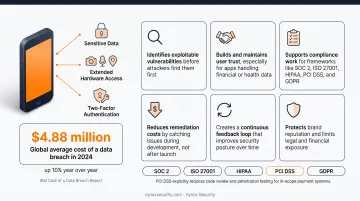
These compliance frameworks don't all mandate mobile pentesting by name. PCI DSS explicitly requires code review and penetration testing for in-scope payment systems.
SOC 2, ISO 27001, HIPAA, and GDPR are risk-based: MAST findings serve as the evidence auditors expect to see, even when the standard itself doesn't spell out "test your mobile app."
How Mobile Application Security Testing Works – Step by Step
MAST is a structured process, not a one-off scan. Teams that skip steps, especially scoping upfront or retesting at the end, end up with reports full of gaps and false confidence. Here's how a thorough engagement runs.
Step 1 – Define Scope and Objectives
Before any testing starts, identify what's actually in scope: the client app, backend APIs, third-party SDKs, and any relevant compliance goals. This step determines everything downstream. Skip it, and testers either waste time on low-risk areas or miss the components that matter most to your business.
Step 2 – Gather Information and Access
With scope locked in, testers need app builds (APK for Android, IPA for iOS), architecture documentation, test credentials for every user role, and any existing threat models. The more complete this handoff, the deeper and more accurate the resulting assessment.
Step 3 – Static Analysis (SAST)
With access secured, testers scan source code or compiled binaries for insecure coding patterns, hardcoded API keys, and improper handling of sensitive data, all before the app ever runs. Catching issues here is cheap. Catching the same issue after release costs far more in engineering time and rework.
Step 4 – Dynamic and Runtime Analysis (DAST)
With static analysis complete, the app now runs on emulators and real devices, while testers probe authentication flows, session handling, network traffic, and API responses under adversarial conditions. This step reveals how the app actually behaves under attack, not just how the code reads on paper.
Step 5 – Manual Penetration Testing
Automated scanners are fast, but they don't understand business logic. Human testers attempt to bypass SSL pinning, defeat root or jailbreak detection, and chain together smaller flaws into a real exploit path. This step catches what tools consistently miss and cuts down on false positives from earlier scans.
Step 6 – Report, Remediate, and Retest
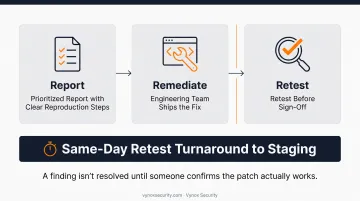
A prioritized report with clear reproduction steps goes to your engineering team. Then, and this gets skipped more often than it should, testers verify each fix through a retest before sign-off.
At Vynox, retests typically happen the same day a fix ships to staging, so verified remediation doesn't stall your release schedule. A finding isn't resolved until someone confirms the patch actually works.
Testing Methods, Tools & Common Vulnerabilities
Every MAST program rests on a handful of core methods and a recurring set of vulnerability categories. Here's the breakdown.
SAST, DAST, IAST, and SCA Explained
Manual testing puts a human tester in the driver's seat, interacting with the app the way an attacker would to uncover business logic flaws and chained vulnerabilities that scanners can't reason through. Common tools include Burp Suite for intercepting traffic, Frida for runtime instrumentation, and MobSF for automated static and dynamic scanning.
Automated testing (SAST, DAST, and SCA tools) scans code and running apps at scale, delivering speed and consistent coverage across every build. Neither approach alone is sufficient; combining both catches issues that either method misses on its own.
SAST, DAST, and IAST Explained
- SAST examines source code or compiled binaries before the app runs, using a white-box approach
- DAST tests the running application from the outside, simulating real attack conditions as a black-box approach
- IAST combines runtime instrumentation with code analysis to pinpoint vulnerable lines directly, though it's a general security technique rather than a MASTG-specific phase
SCA (Software Composition Analysis) tools track risk in third-party and open-source libraries, a category that matters more than most teams assume. ParkMobile's 2021 breach, which affected roughly 21 million users according to reporting from Krebs on Security, traced back to a vulnerability in third-party software the company relied on. It's a clear reminder that your app's security is only as strong as every dependency baked into it.
OWASP Mobile Top 10 Vulnerabilities to Watch
| Category | What It Covers |
|---|---|
| Improper Credential Usage | Hardcoded or exposed tokens, keys, and passwords |
| Inadequate Supply Chain Security | Risk from third-party libraries and SDKs |
| Insecure Authentication/Authorization | Weak identity verification or access control |
| Insufficient Input/Output Validation | Unvalidated data enabling injection attacks |
| Insecure Communication | Weak TLS or certificate validation in transit |
| Insecure Data Storage | Sensitive data leaked through logs, caches, or backups |
| Insufficient Cryptography | Weak or broken encryption implementations |
| Inadequate Privacy Controls | Improper handling or exposure of personal user data |
| Insufficient Binary Protections | Missing safeguards against tampering or reverse engineering |
| Security Misconfiguration | Insecure default settings or misconfigured app permissions |
Testing against the OWASP MASVS and MASTG frameworks keeps your program aligned with a standard that gets updated regularly, rather than an internal checklist that goes stale.
How Vynox Security Can Help
Vynox Security tests both AI-specific attack surfaces and traditional infrastructure, including mobile apps on iOS and Android, so nothing in your stack goes unchecked. Mobile engagements run through static, dynamic, and runtime analysis, including binary reverse engineering and certificate pinning bypass, without needing your source code.
Testing covers the risks that matter most:
- Insecure local storage and credential/token leakage
- Weak transport security and API authentication flaws
- Vulnerabilities in embedded AI features and on-device models
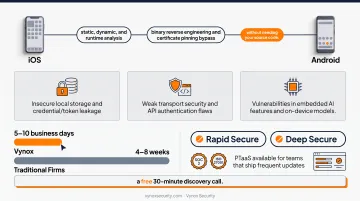
Speed matters just as much as depth here. Vynox delivers mobile engagements in 5–10 business days, compared to the 4–8 weeks typical of traditional firms. Every engagement includes full OWASP coverage and developer-ready fix guidance with reproduction steps engineers can act on immediately.
This pace doesn't sacrifice depth. Compliance-ready evidence packs map findings to SOC 2 and ISO 27001, while a real-time dashboard tracks open vulnerabilities, resolved issues, and overall security posture.
These deliverables span two engagement formats. Choose Rapid Secure (fast, compliance-ready) or Deep Secure (comprehensive adversarial testing), with PTaaS available for teams that ship frequent updates. Start with a free 30-minute discovery call to scope your app's specific risk profile before testing begins.
Frequently Asked Questions
What is mobile application security testing?
It's the process of evaluating apps on Android and iOS for vulnerabilities using static analysis, dynamic analysis, and penetration testing, typically guided by OWASP's Mobile Security Testing Guide.
How do you perform manual mobile application security testing?
Testers manually interact with the app, attempting to bypass protections like SSL pinning and exploit business logic or authentication flaws. They then validate real-world exploitability using tools like Burp Suite and Frida.
What's the difference between SAST, DAST, and MAST for mobile apps?
SAST and DAST are specific techniques: static versus runtime testing. MAST is the broader discipline that incorporates both, plus manual penetration testing, for mobile-specific risks.
How long does a mobile app security testing engagement typically take?
Timelines vary based on complexity, but simple apps often wrap in about a week, while apps with payment integrations or advanced security features can take three or more weeks.
What is the OWASP Mobile Top 10 and why does it matter?
It's a regularly updated list of the most critical mobile security risks, used as a benchmark to prioritize testing focus and vulnerability remediation across engagements.
How often should mobile apps undergo security testing?
Test before major releases, after significant code changes, and on a continuous cadence tied to development sprints, not as a single pre-launch check that never gets revisited.