
Introduction
Mobile applications handle financial records, health data, and authentication credentials — making them high-value targets. According to NowSecure benchmark data, 85% of public-store apps carry security flaws, and 70% can leak personal data. Yet in a 2024 survey of 485 senior mobile security leaders, only 43% tested every release.
Mobile application security testing (MAST) is the structured process of identifying vulnerabilities across Android and iOS platforms using static analysis, dynamic analysis, and penetration testing — so vulnerabilities get caught internally, not exploited externally.
This article covers what you need to build or sharpen a testing program:
- The most common mobile vulnerabilities and where they hide
- How static, dynamic, and penetration testing methods differ
- Which tools are worth using — and for what
- Operational best practices for consistent coverage
- Real challenges teams run into, and how to address them
Key Takeaways
- The OWASP Mobile Top 10 (2024) is the baseline taxonomy every testing program should reference
- SAST, DAST, and manual penetration testing are complementary — no single method provides complete coverage
- Insecure data storage, weak authentication, and unencrypted communication top the list of exploited vulnerability classes
- Real devices expose vulnerability classes that emulators simply cannot replicate
- Run automated scans on every build and schedule manual penetration testing before every major release
Common Mobile App Security Vulnerabilities
Understanding the vulnerability landscape is where every testing program starts. The OWASP Mobile Top 10 2024 Final Release provides the industry-standard taxonomy teams should anchor their testing to. Here are the categories that cause the most real-world damage.
Insecure Data Storage
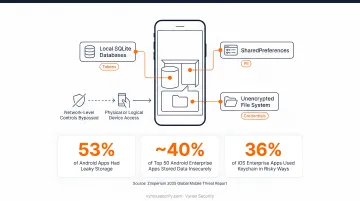
Mobile apps frequently store sensitive data — tokens, PII, credentials — in unprotected locations: local SQLite databases, SharedPreferences, or the file system without encryption. An attacker with physical or logical device access can extract this data directly, bypassing any network-level controls entirely.
Zimperium's 2025 Global Mobile Threat Report found 53% of Android apps had leaky storage, and nearly 40% of the top 50 Android enterprise apps stored information insecurely. Almost 36% of iOS enterprise apps used Keychain in ways that could leak data.
Weak Authentication and Session Management
Weak password policies, missing multi-factor authentication, improper session timeout enforcement, and failure to invalidate sessions after logout all create entry points. These flaws affect both the app frontend and its backend API — credential-stuffing, brute-force, and session hijacking attacks all exploit the same gaps.
Insecure Network Communication
Transmitting data over HTTP instead of HTTPS, using outdated TLS versions, or failing to properly validate SSL/TLS certificates exposes traffic to man-in-the-middle attacks. Zimperium measured 59% insecure communication among Android apps — a particularly dangerous finding given how frequently users connect through public Wi-Fi.
Code Tampering and Reverse Engineering
Attackers can decompile APK and IPA binaries to extract hardcoded API keys, secrets, or business logic — then repackage and redistribute tampered versions of the app. Without code obfuscation or integrity checks, apps are straightforward to reverse.
The protection gap is stark: while 78% of analyzed apps had some code protection, 74% of those relied solely on R8 — and only 3% used a dedicated commercial code-protection tool.
Excessive Permissions and Data Leakage
Overly permissive permission requests expand the attack surface beyond what the app actually needs. Improper data handling compounds this — sensitive information leaks through channels that are typically invisible to the developer during testing:
- Clipboard contents accessible to other installed apps
- Crash logs that capture session tokens or PII
- Background app snapshots stored unencrypted by the OS
- Location, microphone, or contacts access granted far beyond functional need
Mobile App Security Testing Methods
MAST is not a single technique. Effective programs layer multiple complementary methods — because no single approach catches everything.
Static Application Security Testing (SAST)
SAST analyzes source code, bytecode, or compiled binaries without executing the application. It's white-box testing: testers have full access to the codebase and can catch hardcoded secrets, insecure API calls, and dangerous data handling patterns early in the CI/CD pipeline — before a functional build even exists.
Dynamic Application Security Testing (DAST)
DAST tests the running application in real-time by simulating attacks against inputs, APIs, and network traffic. It's black-box testing: it uncovers runtime issues like broken authentication, unvalidated redirects, and insecure data transmission that static analysis would miss. A functional build is required to run DAST.
Interactive Application Security Testing (IAST)
IAST uses agents or sensors embedded in the app at runtime to observe internal data flows during functional testing. It bridges the gap between SAST and DAST — combining runtime visibility with source-level traceability. In practice, IAST agents inject instrumentation into a mobile binary and run it on a real device, capturing insecure configurations and vulnerable third-party library calls that neither SAST nor DAST reliably surfaces on its own.
Mobile Penetration Testing
Manual penetration testing simulates a real attacker: reconnaissance, manual exploitation of authentication and business logic flaws, and verification of real-world impact. It uncovers deeper, context-dependent vulnerabilities that automated scanners cannot reason about — broken access controls, chained exploit paths, and logic flaws unique to the application.
Unlike automated tools, penetration testing produces findings with verified exploitability, which matters both for remediation prioritization and for compliance evidence requirements. Vynox delivers mobile pentest findings mapped directly to SOC 2, ISO 27001, and PCI DSS controls within 5–10 business days — compared to the 4–8 week timelines typical of traditional firms.
Fuzz Testing
Fuzz testing injects malformed, random, or boundary-case inputs into app entry points — forms, file parsers, APIs — to trigger crashes, memory leaks, or unexpected behavior. It's particularly effective for discovering input validation failures and edge-case vulnerabilities that structured test cases systematically miss.
Choosing the Right Method: A Quick Reference
No method is sufficient alone. Here's how they compare across key dimensions:
| Method | Test Approach | Requires Running App | Best For |
|---|---|---|---|
| SAST | White-box (source/binary) | No | Hardcoded secrets, insecure API calls |
| DAST | Black-box (live inputs) | Yes | Runtime auth flaws, data transmission issues |
| IAST | Agent-instrumented runtime | Yes | Third-party library risks, config issues |
| Penetration Testing | Manual attacker simulation | Yes | Business logic flaws, chained exploits |
| Fuzz Testing | Malformed input injection | Yes | Input validation failures, edge-case crashes |
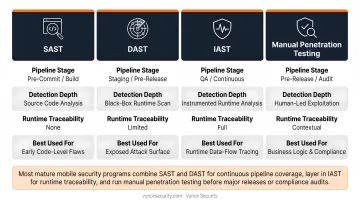
Most mature mobile security programs combine SAST and DAST for continuous pipeline coverage, layer in IAST for runtime traceability, and run manual penetration testing before major releases or compliance audits.
Essential Tools for Mobile App Security Testing
The right toolset depends on the testing method. Teams typically combine open-source tools with commercial platforms to achieve broad coverage across static, dynamic, and network-level testing.
Open-Source Tools Worth Knowing
| Tool | Primary Use | Platforms |
|---|---|---|
| MobSF (v4.5.1) | All-in-one static and dynamic analysis for APK/IPA files | Android & iOS |
| OWASP ZAP | Intercepting and scanning mobile API/web traffic | Both |
| Drozer (v3.0.0) | Android runtime and IPC security assessment | Android only |
| Frida (v17.8.3, March 2026) | Dynamic instrumentation and runtime hooking | Android & iOS |
MobSF is often the starting point for teams new to mobile security testing — it handles both static and dynamic analysis in a single framework. Frida is the go-to for runtime instrumentation work, particularly certificate pinning bypass.
Commercial and Enterprise Platforms
- Burp Suite Professional — Proxy-based traffic interception and mobile API testing; strong CI/CD integrations
- Veracode — Enterprise SAST with Java/Kotlin (Android) and Swift/Objective-C (iOS) support
- Checkmarx — Source-code SAST for Android and iOS, with current 2026 documentation
- Appknox — Binary-focused static/dynamic mobile testing and API analysis
- NowSecure — Mobile SAST, DAST, IAST, API, and privacy testing on a single platform
Commercial tools generally offer lower false positive rates and broader language coverage — worth the investment when you need audit-ready output or direct pipeline integration. Open-source tools remain the right choice for targeted, hands-on testing where flexibility matters more than polish.
Applying the OWASP MASTG as a Testing Framework
Having the right tools is only half the equation. The OWASP MASTG v2.0.0 and MASVS v2.1.0 give those tools direction — defining what to test across the full mobile attack surface, not just how to run a scanner.
MASVS v2.1.0 defines eight control categories:
- STORAGE — Secure local data handling
- CRYPTO — Correct cryptographic implementation
- AUTH — Authentication and session management
- NETWORK — Secure data transmission
- PLATFORM — Safe use of platform APIs and features
- CODE — Binary protections and supply chain
- RESILIENCE — Anti-tampering and anti-reverse-engineering
- PRIVACY — Data minimization and privacy controls
Mapping tool outputs to MASVS controls converts raw findings into structured, audit-ready evidence — each vulnerability tied to a specific control, prioritized for remediation, and ready to present to compliance reviewers.
Mobile App Security Testing Best Practices
The difference between a reactive security program and a resilient one comes down to how testing is built into your process — not bolted on afterward.
Shift Left and Integrate Testing into CI/CD
The shift-left principle means integrating SAST at code commit, DAST in staging environments, and software composition analysis (SCA) for dependency checks on every build. Catching vulnerabilities early dramatically reduces remediation cost compared to finding them post-release.
OWASP explicitly links mobile security to CI/CD automation, noting that automated static and dynamic tests are necessary to match Agile development cadence.
Use Multiple Testing Methods Together
SAST, DAST, and manual penetration testing are complementary. A practical layering approach:
- SAST — Run at code commit; catches code-level issues before they reach a build
- DAST — Run in pre-release staging; catches runtime and network-layer issues
- Manual penetration test — Before major releases or significant feature changes; catches logic flaws and chained vulnerabilities that automation cannot reason about
For teams needing compliance-ready pentest reports with developer-friendly remediation guidance, working with a specialized mobile security testing firm like Vynox Security ensures findings map directly to specific control requirements — not delivered as generic vulnerability lists.
Don't Neglect Backend and API Security
A mobile app is only as secure as the APIs it communicates with. A hardened frontend is meaningless if the backend exposes:
- Broken object-level authorization
- Excessive data exposure
- Missing rate limiting
A complete mobile security assessment must include the API layer — often best scoped as a dedicated API security engagement running alongside the mobile pentest.
Test on Real Devices, Not Just Emulators
Emulators leave coverage gaps. Real devices expose OS-specific behaviors, carrier configurations, and hardware-level interactions that simulators don't replicate. Vulnerability classes that require physical hardware include:
- Certificate pinning bypass
- Bluetooth-based attacks
- NFC exploits
If your testing program relies exclusively on emulators, you have blind spots — it's just a question of where.
Challenges in Mobile App Security Testing
Platform and Device Fragmentation
Android's ecosystem of third-party OS versions and diverse device hardware makes exhaustive coverage impossible to achieve fully. Prioritize testing on the OS versions and device types that represent the majority of your user base, then apply a risk-based framework to determine which additional configurations need attention.
Limited DAST Tooling for Mobile
Most DAST frameworks were designed for web applications and have limited native support for mobile-specific behaviors: deep links, inter-process communication, and push notification handling. Combine mobile-specific proxying tools like Burp Suite (configured for mobile) with manual testing to cover what automated DAST misses. The MASTG explicitly treats deep links and IPC as separate test surfaces requiring their own coverage.
Balancing Security Testing Cadence with Release Velocity
Fast-moving development sprints and thorough security testing create genuine tension. A tiered cadence resolves it:
- Every build — Automated SAST and dependency checks
- Every release — Lightweight DAST scan and a security review pass
- Major releases / annually — Full manual penetration test
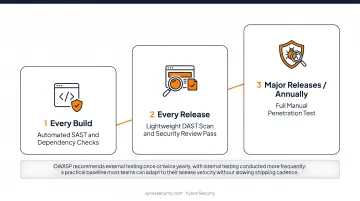
OWASP describes external testing once or twice yearly with internal testing conducted more frequently — a practical baseline that most teams can adapt to their release velocity without slowing shipping cadence.
Frequently Asked Questions
What is mobile application security testing (MAST)?
MAST is the structured process of identifying security vulnerabilities in mobile apps through a combination of static analysis, dynamic analysis, and manual penetration testing — across Android and iOS platforms. Gartner defines the MAST market as products and services that analyze and identify vulnerabilities in mobile computing and communications technologies.
What is the difference between SAST and DAST in mobile app security testing?
SAST analyzes source code or binaries without running the app, making it ideal for catching code-level issues early in development. DAST tests the running application in real-time to find runtime vulnerabilities like broken authentication and insecure data transmission. Using both together covers the full vulnerability spectrum — neither method alone is sufficient.
How often should mobile apps undergo security testing?
OWASP recommends automated static and dynamic testing on every CI/CD build, with internal testing conducted frequently and external third-party testing once or twice yearly. In practice: automated scanning on every build, a security review with every release, and a full manual penetration test before major version releases.
What is the OWASP Mobile Application Security Testing Guide (MASTG)?
The MASTG (v2.0.0) is the authoritative open-source manual for mobile app security testing and reverse engineering. It pairs with the MASVS (v2.1.0), which defines the security controls apps must meet — MASVS tells you what to achieve, MASTG tells you how to verify it. Together, they form the foundational framework for any structured mobile security program.
What are the most commonly exploited mobile app vulnerabilities?
Insecure data storage, weak authentication and session management, insecure network communication, and insufficient binary protections (enabling code tampering and reverse engineering) are among the most frequently exploited. The OWASP Mobile Top 10 2024 is the canonical reference list for the complete taxonomy.
How does mobile app penetration testing support SOC 2 or ISO 27001 compliance?
Penetration testing generates evidence of security control validation that auditors require for SOC 2 and ISO 27001 assessments. Reports with findings mapped to specific control requirements — rather than generic vulnerability lists — give auditors directly usable evidence, eliminating the need to manually translate technical findings into compliance language.