Most security teams pentest their web app, their API, maybe their cloud environment. Salesforce quietly sits outside that scope. Misconfigured guest users, over-permissioned profiles, exposed APIs, and insecure custom Apex code turn it into a blind spot most CTOs never actually test.
This guide breaks down Salesforce's unique attack surface, the vulnerabilities pentesters find most often, the testing process itself, and the best practices that keep your org secure between test cycles.
Key Takeaways
- Salesforce secures the infrastructure; you secure configuration, code, and access under this shared responsibility model
- OLS, FLS, and RLS form the core access layers every Salesforce pentest must validate
- SOQL injection, over-permissioned profiles, exposed APIs, and guest user access dominate real-world findings
- Agentforce and other AI agents introduce prompt injection and data retrieval risks traditional pentests miss
Why Salesforce Penetration Testing Matters
The Shared Responsibility Reality
Salesforce secures the data centers, the patching, and encryption at rest. That's their job, and they do it well. Everything else is yours to secure: your configurations, your custom code, your integrations, your user access.
This split matters because most breaches involving Salesforce orgs aren't caused by Salesforce's infrastructure failing. They're caused by customer-side misconfigurations: a guest profile with too much access, an Apex class that skips sharing rules, an OAuth app with an overly broad scope.
The Cost of Getting It Wrong
Salesforce orgs often hold PII, financial records, signed contracts, and product IP: exactly the kind of data attackers hunt for. According to IBM's 2024 Cost of a Data Breach Report, the global average breach cost has climbed to $4.99 million, up 12% year over year.
Credential misuse is a major driver of that number. Verizon's 2024 Data Breach Investigations Report found credential abuse behind 13% of breaches as the initial access point. It appeared in 39% of all breaches overall, with the human element involved in 62% of cases.
That's directly relevant to Salesforce security. Stale accounts, "just in case" permissions, and unused integration users are exactly the kind of credential sprawl attackers exploit.
Compliance Evidence and a Moving Target
Pentesting also generates audit-ready evidence for the frameworks most Salesforce-heavy organizations already answer to:
- GDPR Article 32 requires organizations to regularly test the effectiveness of technical safeguards
- HIPAA's Security Rule mandates administrative, physical, and technical safeguards for health data
- SOC 2 and ISO 27001 both expect documented control testing as part of the audit trail
Salesforce also ships three major releases a year (Spring, Summer, and Winter), plus constant third-party integration changes. That's why a single annual review isn't enough: the attack surface simply doesn't stay still.
Understanding Salesforce's Unique Attack Surface
Salesforce's architecture splits roughly into two layers testers need to think about separately: the SaaS configuration layer, and the PaaS layer where custom code lives.
The SaaS Layer: Access Control Fundamentals
Salesforce's data model is built on Objects (tables), Fields (columns), and Records (rows). Every meaningful access control decision in Salesforce maps back to one of three layers:
- Object-Level Security (OLS) — can this user access the object at all (Accounts, Opportunities, custom objects)?
- Field-Level Security (FLS) — can this user see or edit a specific field, even if they can access the object?
- Record-Level Security (RLS) — can this user see this specific record, based on ownership, role hierarchy, or sharing rules?
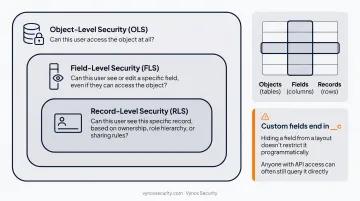
Custom objects and fields — identifiable by their __c suffix — are the most common source of misconfiguration. They're frequently hidden from page layouts in the UI, which gives teams a false sense of security.
Hiding a field from a layout doesn't restrict it programmatically. Anyone with API access can often still query it directly.
The PaaS Layer: Custom Code Risks
Apex, Salesforce's proprietary language, lets developers build custom business logic on the platform. That flexibility introduces the same category of risks you'd find in any custom web application, plus a few Salesforce-specific twists.
Without sharing classes are the biggest risk here. Apex classes declared without sharing bypass standard sharing rules entirely, meaning the code can return records regardless of what the requesting user should actually see. A single misconfigured class can undermine your entire RLS model.
SOQL injection works almost exactly like SQL injection. When user input gets concatenated directly into a dynamic SOQL query instead of using bind variables, an attacker can manipulate the query structure and pull data well beyond their intended access. Salesforce's own developer guidance recommends static SOQL with bind variables as the primary defense, with escapeSingleQuotes() and type casting as secondary controls.
Lightning and Aura endpoints (think /aura and /s/sfsites/aura) are also prime reconnaissance targets. Inspecting the POST requests these endpoints generate can reveal object metadata, exposed Apex controllers, and sometimes authentication tokens, particularly on Experience Cloud sites with loose guest permissions.
Common Salesforce Vulnerabilities & Attack Vectors
Across most Salesforce pentests, the same handful of issues show up again and again.
Over-permissioned users and profiles. "Just in case" access requests pile up over time, and default System Administrator assignments get handed out far more liberally than they should be. Quarterly audits catch this before it becomes a liability.
Insecure guest user configurations. Experience Cloud sites often leave guest profiles with more access than intended — internal objects, sensitive fields, or even unauthorized record creation permissions that were never meant to be public.
API misconfigurations. This covers a few related problems:
- Unauthenticated or overly permissive REST, SOAP, and Bulk API endpoints
- OAuth connected apps scoped with broader permissions than the integration actually needs
- Field-Level Security that's enforced in the UI but skipped at the API layer
Third-party AppExchange app risk. Installed packages often receive broad object and Apex execution permissions during setup, and those permissions rarely get revisited once the app is running. A one-time install can leave a permanent, unaudited hole.
The emerging AI attack surface. As organizations layer Agentforce or Einstein Copilot on top of their Salesforce org, a new category of risk appears:
- Prompt injection through fields an agent reads, like a Web-to-Lead description
- Unauthorized data retrieval via the agent's own reasoning process
- Unintended action execution when an agent has more tool access than it needs
This isn't theoretical. Security researchers at Noma disclosed a CVSS 9.4 indirect prompt injection chain in Agentforce during 2025, where malicious instructions planted in a lead form field could trigger data exfiltration once an employee invoked the agent. Salesforce patched the underlying trust issue within weeks of disclosure.
Traditional Salesforce pentest firms aren't built to test these AI-specific vectors. Their methodologies were designed for web app and configuration testing, not adversarial agent behavior.
This is where AI-native testing approaches fill the gap. Vynox Security's dedicated LLM and autonomous agent methodologies cover prompt injection, tool-call abuse, and unauthorized data retrieval for orgs running AI on top of their CRM.
The Salesforce Penetration Testing Process
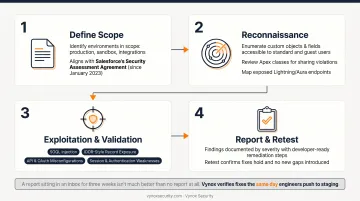
A properly scoped Salesforce pentest follows four stages.
- Define scope. Identify which environments (production, sandbox, specific integrations) are in scope. Confirm the plan aligns with Salesforce's own Security Assessment Agreement, which has permitted customer-run security assessments without prior Salesforce approval since January 2023.
- Reconnaissance. Enumerate custom objects and fields accessible to standard and guest users, review Apex classes for sharing violations, and map exposed Lightning/Aura endpoints.
- Exploitation and validation. Test for SOQL injection, IDOR-style record exposure, API and OAuth misconfigurations, and session or authentication weaknesses.
- Report and retest. Document findings by severity with remediation steps developers can act on, then retest to confirm the fixes hold and didn't introduce new gaps.
That last step is where a lot of engagements fall short.
A report that sits in an inbox for three weeks before anyone acts on it isn't much better than no report at all.
Vynox's approach ties retesting directly to deployment: fixes get verified the same day engineers push them to staging, rather than waiting for the next scheduled test window.
Best Practices for Securing Your Salesforce Environment
Testing finds problems. These practices reduce how many problems there are to find.
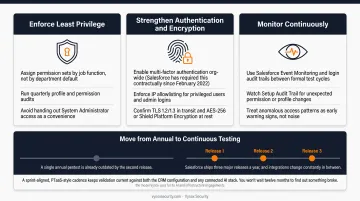
Enforce least privilege.
- Assign permission sets by job function, not by department default
- Run quarterly profile and permission audits
- Avoid handing out System Administrator access as a convenience
Strengthen authentication and encryption.
- Enable multi-factor authentication org-wide (Salesforce has required this contractually since February 2022)
- Enforce IP allowlisting for privileged users and admin logins
- Confirm TLS 1.2/1.3 in transit and AES-256 or Shield Platform Encryption at rest
Monitor continuously.
- Use Salesforce Event Monitoring and login audit trails between formal test cycles
- Watch Setup Audit Trail for unexpected permission or profile changes
- Treat anomalous access patterns as early warning signs, not noise
Move from annual to continuous testing. Salesforce ships three major releases a year, and integrations change constantly in between. A single annual pentest is already outdated by the second release.
A sprint-aligned, PTaaS-style cadence (the model Vynox uses for its AI and infrastructure engagements) keeps validation current against both the CRM configuration and any connected AI stack. You won't wait twelve months to find out something broke.
Frequently Asked Questions
What are the 5 stages of penetration testing?
Most frameworks cover reconnaissance, scanning, vulnerability assessment, exploitation, and reporting. Some methodologies, like NIST SP 800-115, condense this into planning, discovery, attack, and reporting instead.
Does Salesforce allow penetration testing?
Yes. Salesforce has permitted customers to test their own orgs without prior approval since January 2023, under its published Security Assessment Agreement. Testing in a sandbox first is strongly recommended before touching production.
What are the four types of security in Salesforce?
Organization-level, Object-level, Field-level, and Record-level security form the four core layers. Each governs a different scope of access, from who can log in to who can see a specific record.
What is TLS in Salesforce?
TLS (Transport Layer Security) is the encryption protocol that protects data moving between users and Salesforce's servers. Salesforce currently supports TLS 1.2 and 1.3, having deprecated older, weaker versions.
How often should you penetration test your Salesforce org?
At least once a year, with additional testing after major releases, new integrations, or new compliance requirements. Organizations running frequent changes typically benefit from a continuous, sprint-aligned cadence instead.
What tools are commonly used for Salesforce penetration testing?
Burp Suite, Postman, OWASP ZAP, and Salesforce Inspector cover most configuration and API testing needs. Orgs running Agentforce or Einstein Copilot also need AI-native testing methodologies, since these tools weren't built to catch prompt injection or agent-specific risks.