Introduction
AWS now controls 28% of the global cloud infrastructure market, according to Synergy Research Group's Q1 2024 data. That scale makes network security configuration on AWS one of the highest-stakes jobs on any engineering team.
AWS hands you dozens of tools to lock things down: VPCs, Security Groups, NACLs, WAF, Shield, Network Firewall. The catch? Misconfigure even one, and sensitive data walks out the door. The 2024 Thales Cloud Security Study found 31% of respondents attributed cloud data breaches directly to misconfiguration or human error.
This guide breaks down AWS's core networking building blocks, layered firewall services, and encryption standards. It also covers the practices that separate a secure AWS environment from a future incident report.
Key Takeaways
- AWS secures infrastructure; customers configure network controls under the Shared Responsibility Model
- 82% of studied data breaches involved cloud-stored data, per IBM research
- Security Groups, NACLs, and Network Firewall guard different layers; none replaces the others
- AES-256 encryption covers data at rest by default across S3, EBS, and RDS
- Manual reviews alone can't keep pace with fast-shipping AWS teams — continuous testing closes that gap
What Is AWS Network Security?
AWS network security is a joint effort. It's the combination of AWS-managed infrastructure protections and customer-configured controls, meaning VPC design, firewalls, IAM policies, and encryption, that together protect your data, workloads, and traffic.
This joint effort has a name: the Shared Responsibility Model. AWS secures "the cloud," meaning the physical data centers, hypervisor, and global network backbone. You secure "in the cloud," meaning your VPC configurations, security groups, and IAM policies.
Miss that distinction, and you'll assume AWS is handling something it never touched.
The stakes are real. IBM's Cost of a Data Breach research found that 82% of studied breaches involved data stored in the cloud, with only 18% involving on-premises data alone, according to IBM's 2023 breach cost analysis. Configuring your cloud environment correctly closes that gap.
Every AWS network security strategy should address four control types:
| Control type | Purpose | AWS-native example |
|---|---|---|
| Preventative | Stops an event before it happens | Security Groups, KMS key policies |
| Proactive | Evaluates resources before deployment | Control Tower proactive controls |
| Detective | Detects and alerts after an event | GuardDuty, CloudTrail, VPC Flow Logs |
| Responsive | Drives remediation after deviation | Config remediation via Systems Manager Automation |
A mature setup touches all four. Teams that only invest in preventative controls (locking down Security Groups) but skip detective ones (GuardDuty, Flow Logs) often don't notice a breach until weeks later.
Core Components of AWS Network Infrastructure
Before any firewall rule matters, your network architecture has to be sound. A secure AWS environment starts with how you structure VPCs, subnets, and gateways, not with how many security tools you bolt on afterward.
Virtual Private Cloud (VPC) & Subnets
A VPC is a logically isolated section of AWS where your resources launch. Subnets carve that VPC's IP range into smaller zones, some public, some private, giving you granular control over where each resource lives.
Best practice here isn't complicated:
- Deploy subnets across multiple Availability Zones for fault tolerance
- Keep databases and backend systems in private subnets, invisible to direct internet traffic
- Segment workloads by sensitivity, not just by application
This isn't optional polish. A flat VPC with everything in one public subnet is an open invitation for lateral movement the moment one instance gets compromised.
Gateways: Internet Gateway & NAT Gateway
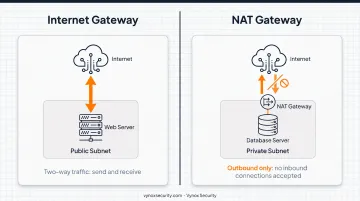
Once subnets are segmented, the next question is what each one can reach on the internet, and what can reach it back. Two gateway types answer that, and they work in opposite directions. An Internet Gateway enables two-way communication, meaning instances can both send and receive traffic from the internet. A NAT Gateway works one direction only: it lets private-subnet instances reach out for updates and patches without ever accepting inbound connections.
That asymmetry is the whole point. Your database server can pull a security patch through a NAT Gateway, but nobody on the internet can initiate a connection to it directly. Get this backward, and you've effectively exposed a resource that should never see a public IP.
AWS Firewall Services: Security Groups, NACLs & Network Firewall
Is AWS a firewall? Not exactly. AWS instead provides a stack of layered firewall services that you configure yourself, each one covering a different scope of your network.
Security Groups are stateful, instance-level virtual firewalls that control inbound and outbound traffic for EC2 instances and similar resources, and because they're stateful, return traffic for an already-allowed connection passes automatically.
Network ACLs (NACLs) work at the subnet level and are stateless. Inbound and outbound rules get evaluated separately, in numeric order, giving you a second layer of control across entire groups of instances rather than individual resources.
AWS Network Firewall operates at the VPC perimeter as a managed, auto-scaling service delivering Layer 3-7 inspection, stateful traffic filtering, and intrusion detection/prevention, built on Suricata under the hood.
Here's when to reach for each:
| Service | Scope | Best for |
|---|---|---|
| Security Groups | Instance-level | Controlling access to a specific EC2 resource |
| NACLs | Subnet-level | Broad allow/deny rules across a subnet |
| Network Firewall | VPC-wide | Perimeter inspection, inter-VPC traffic filtering |
Two more pieces round out the stack:
- AWS WAF protects web applications and APIs from Layer 7 attacks like SQL injection and cross-site scripting
- AWS Shield defends against DDoS attacks, with Shield Standard covering Layers 3-4 and Shield Advanced extending automatic mitigation to Layer 7
None of these five services replaces another; they're complementary layers, and skipping one leaves a gap the others weren't designed to cover. In fact, misconfigured Security Groups and NACLs are among the most common findings in the cloud security assessments Vynox Security runs for clients hardening their AWS environments.
Encryption & Data Protection in AWS
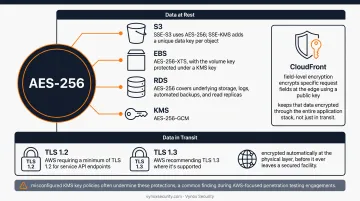
Does AWS use AES-256? Yes, across the board for data at rest. S3, EBS, and RDS all support AES-256 encryption via AWS Key Management Service (KMS), though the implementation details vary slightly by service.
- S3: Default server-side encryption (SSE-S3) uses AES-256; SSE-KMS adds a unique data key per object
- EBS: Encrypted volumes use AES-256-XTS, with the volume key protected under a KMS key
- RDS: AES-256 covers underlying storage, logs, automated backups, and read replicas
- KMS symmetric keys: Use AES-256-GCM specifically
Data in transit gets a different treatment: TLS, with AWS requiring a minimum of TLS 1.2 for service API endpoints and recommending TLS 1.3 where it's supported. AWS also states that traffic crossing its global network between facilities is encrypted automatically at the physical layer, before it ever leaves a secured facility.
For especially sensitive fields, meaning payment card numbers or similarly high-value data, Amazon CloudFront's field-level encryption encrypts specific request fields at the edge using a public key. Only an application holding the matching private key can decrypt them, which keeps that data encrypted through the entire application stack, not just in transit. In practice, misconfigured KMS key policies often undermine these protections, a common finding during AWS-focused penetration testing engagements.
AWS Network Security Best Practices
Good architecture and layered firewalls only get you so far without operational discipline. A few practices consistently separate resilient AWS environments from fragile ones:
- Enforce least-privilege IAM policies and require MFA for root and human users, limiting the blast radius if a credential leaks.
- Enable VPC Flow Logs and route them into CloudWatch and GuardDuty for real-time traffic visibility.
- Run Network Access Analyzer periodically to catch unintended access paths, meaning routes into your environment nobody explicitly designed.
- Review Security Group and NACL rules on a fixed cadence, not just at initial deployment.
GuardDuty continuously analyzes VPC Flow Logs and CloudTrail events, flagging communication with known malicious domains that a static rule review would never catch on its own.
Automated monitoring catches known threats, but only real-world penetration testing validates whether these configurations resist an actual attacker chaining IAM, network, and API flaws together.
Why Continuous Security Testing Matters for AWS Environments
Even mature AWS environments accumulate the same findings: overly permissive Security Groups, exposed NACL rules, VPCs that grew organically without a segmentation plan. The root cause is pace, not experience level.
DORA's 2024 survey of nearly 3,000 professionals found 19% of teams deploy on demand, multiple times a day, with another 22% deploying between daily and weekly, according to DORA's Accelerate State of DevOps report.
At that shipping speed, a manual configuration review done once a quarter is already outdated by the time it's finished. Add AI-driven workloads into the mix, where new IAM roles and storage buckets appear mid-sprint, and static audits fall further behind.
Vynox Security's cloud and network penetration testing closes that gap. Rather than a one-time scan, engagements combine configuration review with active exploitation validation, covering:
- Network and security group configuration analysis, checking for overly broad ingress rules and unintended exposure paths
- IAM privilege escalation path mapping, tracing how a low-privilege key might chain its way to admin access
- Public exposure review across S3 buckets, snapshots, and AMIs
- AI workload isolation review, relevant for teams storing model weights or training data in AWS
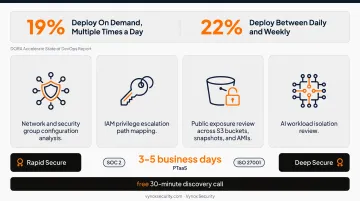
Findings map directly to SOC 2 and ISO 27001 infrastructure control requirements, delivered with developer-ready fix guidance and reproduction steps rather than generic recommendations. Most cloud engagements run 3-5 business days, available as Rapid Secure for fast compliance-ready turnaround or Deep Secure for comprehensive adversarial coverage.
Teams shipping frequently can also run this continuously through Vynox's PTaaS model, aligning testing cadence with sprints rather than annual audits.
For AWS-hosted teams wondering where their own VPC architecture actually stands, a free 30-minute discovery call is a reasonable place to start scoping that answer.
Frequently Asked Questions
What is AWS network security?
AWS network security combines AWS-managed infrastructure protections with customer-configured controls, such as VPC design, firewalls, and IAM policies, to protect your data and traffic. It operates under the Shared Responsibility Model, splitting duties between AWS and the customer.
Is AWS a firewall?
No, AWS itself isn't a single firewall. It provides multiple configurable firewall services, including Security Groups, NACLs, Network Firewall, and WAF, that customers must set up and maintain correctly.
Does AWS use AES-256?
Yes. AWS supports AES-256 encryption for data at rest via KMS across services like S3, EBS, and RDS. TLS separately protects data in transit, requiring at least version 1.2.
What is the difference between Security Groups and Network ACLs?
Security Groups are stateful and operate at the instance level, automatically allowing return traffic. NACLs are stateless and operate at the subnet level, evaluating inbound and outbound rules separately. Most environments use both together for layered defense.
How often should I test my AWS network security configuration?
Test after any major infrastructure change and at minimum quarterly. Fast-moving teams shipping frequent updates benefit more from a continuous PTaaS model that keeps pace with deployment cycles.
Is AWS responsible for securing my network configuration?
Not entirely. Under the Shared Responsibility Model, AWS secures the underlying infrastructure, while you're responsible for correctly configuring VPCs, Security Groups, NACLs, and access controls within it.