That distinction matters. Under AWS's Shared Responsibility Model, you own security "in the cloud" — meaning misconfigured S3 buckets, over-permissioned IAM roles, and exposed metadata services are your problem to find and fix.
An AWS pentesting checklist gives your team a repeatable way to test IAM, storage, compute, network, and serverless layers without missing a step. This guide covers what you need before testing starts, a phase-by-phase methodology, how to read your findings, and the mistakes that turn a good pentest into wasted budget.
Key Takeaways
- Written authorization and defined scope come before any command runs against AWS
- Testing follows six phases: recon, IAM privilege escalation, storage exposure, compute, network, and logging
- Severity triage (Critical, High, Medium, Low) decides what's fixed now versus next sprint
- Automated scanners alone miss IAM trust-relationship chains and multi-region blind spots
- Sprint-aligned testing catches misconfigurations before they age into breaches
What You Need Before Starting an AWS Pentest
AWS pentesting mixes CLI-based enumeration with exploitation frameworks, but the technical work only starts after the legal groundwork is settled. Skip this step and you risk violating AWS's testing policy before you've run a single scan.
Tools and Access Requirements
Most AWS engagements draw from a similar tool stack, regardless of engagement size:
- AWS CLI — the baseline for enumerating and configuring resources across services
- Pacu — an exploitation framework built for AWS-specific privilege escalation and lateral movement
- ScoutSuite / Prowler — misconfiguration auditing against CIS benchmarks and account-wide settings
- enumerate-iam — maps exactly what a given credential set can actually do
- CloudMapper — visualizes account structure and resource relationships
- S3Scanner / AWSBucketDump — hunts for exposed or misconfigured buckets
- trufflehog / git-secrets — scans repos and commit history for hardcoded credentials
- Nmap / Burp Suite — tests exposed services and web-facing APIs
Most engagements start as gray-box tests, meaning the tester receives a read-only credential set or a deliberately "compromised" key to simulate a realistic breach entry point. That mirrors how real attackers usually get in, through a leaked key or an over-permissioned role rather than a zero-day exploit.
Scope, Authorization & Shared Responsibility Rules
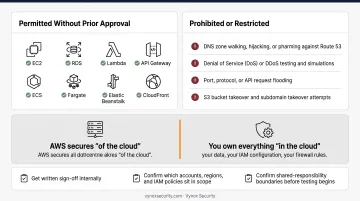
AWS's published penetration testing policy permits testing of most customer-owned resources without prior approval, but it draws firm lines.
Permitted without prior approval: EC2, RDS, Lambda, API Gateway, ECS, Fargate, Elastic Beanstalk, CloudFront, and several other core services.
Prohibited or restricted:
- DNS zone walking, hijacking, or pharming against Route 53
- Denial of Service (DoS) or DDoS testing and simulations
- Port, protocol, or API request flooding
- S3 bucket takeover and subdomain takeover attempts
With these boundaries clear, lock down authorization before testing begins. Get written sign-off internally, confirm which accounts, regions, and IAM policies sit in scope, and remember AWS's shared responsibility split: AWS secures "of the cloud" infrastructure, while you own everything "in the cloud" — your data, your IAM configuration, your firewall rules.
The AWS Pentesting Checklist: Step-by-Step Methodology
Real AWS attacks follow a chain: reconnaissance leads to credential access, which leads to privilege escalation, which leads to lateral movement across services. Your testing should follow that same path rather than jumping randomly between services.
Phase 1: Reconnaissance & Attack Surface Mapping
- Enumerate active regions and services in use (EC2, S3, RDS, Lambda, API Gateway)
- Check the AWS Sign-In URL format for account ID or alias disclosure
- Search for exposed subdomains, public AMIs, or shared snapshots
- Use
describe-imageswith theallflag to surface public AMI ownership data
Phase 2: IAM Enumeration & Privilege Escalation
- List all users, roles, and attached policies
- Flag wildcard (
*) permissions on any action or resource - Test known escalation paths:
iam:PassRole,iam:PutUserPolicy,iam:AttachUserPolicy - Run automated privesc scans through Pacu or enumerate-iam to confirm exploitable chains, not just risky-looking policy names
Phase 3: Storage & Data Exposure Testing
- Audit every S3 bucket's ACLs and bucket policies for public access
- Check EBS snapshots and AMIs for accidental public sharing
- Scan code repositories, commit history, and instance metadata for hardcoded credentials
A misconfigured bucket isn't a theoretical risk. In a documented Check Point case study, a single exposed Securitas bucket leaked roughly 1.5 million files across 3 TB of data — one setting away from being locked down.
Phase 4: Compute, Serverless & Container Testing
- Test whether EC2 instances allow IMDSv1 or enforce IMDSv2 (token-based, blocks SSRF-driven metadata theft)
- Review Lambda environment variables and function permissions for exposed secrets
- Audit ECS/EKS cluster configurations, checking that containers aren't running in privileged mode or sharing kernel access unnecessarily
Phase 5: Network & Database Security Testing
- Review security groups and NACLs for open
0.0.0.0/0or::/0rules on admin ports - Test VPC peering connections for unintended lateral movement paths
- Check RDS instances for public accessibility or weak authentication settings
Phase 6: Logging, Monitoring & Persistence Checks
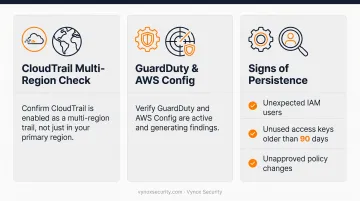
- Confirm CloudTrail is enabled as a multi-region trail, not just in your primary region
- Verify GuardDuty and AWS Config are active and generating findings
- Look for signs of persistence: unexpected IAM users, unused access keys older than 90 days, unapproved policy changes
How to Interpret Your AWS Pentest Findings
A finding is only useful if it's triaged correctly. Misjudge severity and you'll either leave a critical exposure unpatched for weeks or burn a sprint fixing something low-risk.
Quick triage rules:
- Treat anything granting unauthorized data access or account takeover as Critical/High
- Route configuration gaps that raise risk without immediate exploitability to Medium
- Log everything else as Low/Informational for the hardening backlog
| Severity | Examples | Action |
|---|---|---|
| Critical/High | Public S3 buckets with sensitive data, exposed root credentials, working IAM privilege escalation paths | Remediate immediately, rotate affected credentials |
| Medium | Overly broad IAM policies, missing MFA, unencrypted EBS volumes | Schedule into the next remediation sprint |
| Low/Informational | Minor deviations from CIS AWS Benchmarks | Track in a hardening backlog |
The current CIS AWS Foundations Benchmark sits at version 7.0.0. Confirm findings against the specific version and profile (Level 1 or Level 2) you're mapping to. Level 1 controls are meant for broad, low-friction implementation; Level 2 adds defense-in-depth measures that may trade off some operational convenience.
Common Mistakes & Best Practices in AWS Pentesting
Even well-resourced teams repeat the same errors. Watch for these:
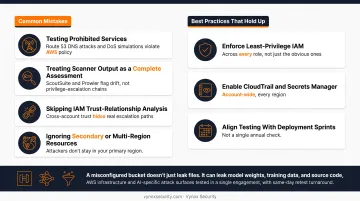
- Testing prohibited services: Route 53 DNS attacks and DoS simulations violate AWS policy regardless of intent
- Treating scanner output as a complete assessment: ScoutSuite and Prowler flag configuration drift, but they won't chain a low-privilege key into full admin access the way a human tester will
- Skipping IAM trust-relationship analysis: cross-account role trust is where a lot of real escalation paths hide
- Ignoring secondary or multi-region resources: attackers don't limit themselves to your primary region, and neither should your testing
Best practices that consistently hold up:
- Enforce least-privilege IAM across every role, not just the obvious ones
- Enable CloudTrail and Secrets Manager account-wide
- Align testing cadence with deployment sprints instead of a single annual check
That last point matters more as AWS environments increasingly host AI workloads: Lambda-based inference endpoints, Bedrock, SageMaker pipelines. A misconfigured storage bucket in these environments doesn't just leak files; it can leak model weights, training data, and source code.
Vynox Security structures its cloud engagements around this reality. Traditional AWS infrastructure and AI-specific attack surfaces get tested in a single engagement, with developer-ready fix guidance and same-day retest turnaround once a fix ships to staging.
Conclusion
A structured, phase-based checklist turns AWS pentesting from a scattered exercise into something repeatable and auditable. But the checklist alone isn't the win. How you interpret severity and how fast you remediate are what separate a useful pentest from a report that sits in a shared drive collecting dust.
If you're scoping an AWS security assessment or want AI workloads tested alongside your cloud infrastructure, Vynox Security's team can help. Karan Singh and the team run free 30-minute scoping calls to map your attack surface and recommend the right engagement tier. Schedule your free scoping call with Vynox Security.
Frequently Asked Questions
Do I need AWS's permission to perform a penetration test on my own account?
AWS allows testing most customer-owned resources without prior approval under its published policy, but you still need to respect service restrictions and confirm account ownership before testing begins.
What AWS services are off-limits for penetration testing?
Route 53 DNS attacks (zone walking, hijacking, pharming) and any Denial of Service or DDoS testing are prohibited without going through AWS's separate DDoS simulation process.
How long does a typical AWS penetration test take?
Timelines depend on scope size and account complexity. Specialized firms like Vynox typically deliver AWS cloud engagements in 5-15 business days, faster than the 4-8 week cycles common at traditional firms.
What's the difference between an AWS penetration test and a cloud security audit?
An audit is a read-only review of configurations against a benchmark. A pentest actively attempts exploitation to prove whether a weakness is truly reachable and damaging.
Which tools are most important for AWS penetration testing?
AWS CLI, Pacu, ScoutSuite or Prowler, and enumerate-iam cover most of the workflow, from enumeration to misconfiguration scanning to privilege escalation testing.
How much does an AWS penetration test typically cost?
Pricing varies by scope, account complexity, and provider. Firms offering transparent, stage-appropriate pricing typically scope cost during an initial discovery call rather than publishing a flat rate.