The platform itself is rarely the weak point. It's the identity setting left too open, the storage account left public, the alert nobody reviewed. Strong Azure security protects more than uptime — it protects customer trust and your standing during a SOC 2 or ISO 27001 audit.
This article covers the shared responsibility model, a practical 2026 best-practices checklist, and how to verify these controls actually hold up under real attack conditions.
Key Takeaways
- Azure security is shared — Microsoft secures the infrastructure; you own identity, data, configuration, and app-layer controls
- Identity controls — MFA, Conditional Access, least privilege — remain the highest-leverage defense against account takeover
- Encryption, segmentation, and monitoring only hold up with continuous testing — not a one-time setup checklist
- Compliance frameworks now demand documented, evidence-based proof that controls actually work
Overview of Azure Cloud Security & the Shared Responsibility Model
Azure cloud security combines Microsoft's built-in platform protections with the customer's own configuration, identity, and data controls. Neither half works without the other.
The shared responsibility model defines exactly where Microsoft's job ends and yours begins. Misunderstanding this line is the root cause of most preventable Azure incidents. Teams often assume Microsoft handles something it explicitly doesn't, like access control or data classification.
IaaS, PaaS, and SaaS: Where Responsibility Shifts
Responsibility shifts depending on the service model you're using:
| Model | Customer owns | Microsoft owns |
|---|---|---|
| IaaS | OS, apps, network config, identity, data | Physical hosts, hypervisor, physical network |
| PaaS | Application code, data, identity | OS, runtime, middleware patching |
| SaaS | Data, identities, access controls | The entire application stack |
Across every model, customers still own data, identities, endpoints, and access controls such as RBAC, MFA, and Conditional Access.
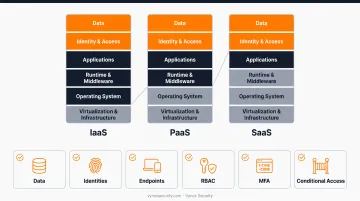
The checklist below covers exactly that customer-owned half of the line.
Top Azure Cloud Security Best Practices for 2026
These practices are ordered by real-world impact, based on how most Azure incidents actually originate rather than a generic feature list.
Identity, Access Management & Zero Trust
Identity is the primary attack surface in the cloud. Microsoft blocked 7,000 password attacks per second over the past year, according to the 2024 Microsoft Digital Defense Report. That volume makes credential-based attacks the default entry point attackers try first.
Four controls do most of the work here:
- MFA enforcement across all users, not just admins
- Conditional Access policies that evaluate user, device, location, and risk signals before granting access
- Azure RBAC scoped tightly to management group, subscription, or resource
- Privileged Identity Management (PIM) for time-bound, approval-gated admin access
| Category | Details |
|---|---|
| Key Controls | MFA, Conditional Access, RBAC, PIM, Just-In-Time access |
| Why It Matters | Blocks the majority of credential-based account takeover attempts |
| Common Tooling | Microsoft Entra ID, Azure AD Conditional Access |
Network Security & Segmentation
Network Security Groups, Azure Firewall, and Private Link work together to limit lateral movement once an attacker gets a foothold. NSGs restrict subnet-level traffic; Azure Firewall inspects both east-west and north-south flows.
One step that remains critical in 2026: stop exposing RDP/SSH directly to the internet. Route remote access through Azure Bastion instead, or restrict it with Defender for Cloud's just-in-time access, which limits exposure to specific source IPs and time windows.
| Category | Details |
|---|---|
| Key Controls | NSGs, Azure Firewall, Azure Bastion, Private Link, DDoS Protection |
| Why It Matters | Reduces exposed attack surface and blocks direct internet-facing exploitation |
| Common Tooling | Azure Firewall Premium, Network Watcher |
Data Encryption at Rest and in Transit
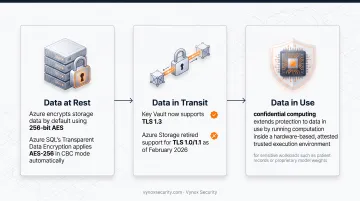
Azure encrypts storage data by default using 256-bit AES, and Azure SQL's Transparent Data Encryption applies AES-256 in CBC mode automatically. Key Vault now supports TLS 1.3, and Azure Storage retired support for TLS 1.0/1.1 as of February 2026.
For sensitive workloads such as patient records or proprietary model weights, confidential computing extends protection to data in use by running computation inside a hardware-based, attested trusted execution environment.
| Category | Details |
|---|---|
| Key Controls | Key Vault, TDE, TLS 1.3, Storage Service Encryption |
| Why It Matters | Protects data confidentiality even if infrastructure is compromised |
| Common Tooling | Azure Key Vault, Azure Confidential Computing |
Continuous Threat Detection & Monitoring
Microsoft Defender for Cloud secures pipelines and monitors posture from a single dashboard, while Microsoft Sentinel adds SIEM/SOAR capability on top. Sentinel's user and entity behavior analytics (UEBA) builds dynamic behavioral profiles for users and hosts, catching anomalies that static rules miss.
| Category | Details |
|---|---|
| Key Controls | Defender for Cloud, Microsoft Sentinel, Azure Monitor alerts |
| Why It Matters | Shrinks detection and response time before damage escalates |
| Common Tooling | Defender for Cloud CSPM, Sentinel SIEM/SOAR |
Application & DevSecOps Security
Azure Web Application Firewall, deployed on Application Gateway or Front Door, uses OWASP Core Rule Set-based managed rules in detection or prevention mode. Pair that with secret-scanning push protection inside Azure DevOps pipelines, and vulnerabilities get caught before they ever reach production.
| Category | Details |
|---|---|
| Key Controls | WAF, CI/CD security scanning, secure coding standards |
| Why It Matters | Prevents vulnerabilities from reaching production in fast-moving release cycles |
| Common Tooling | Azure WAF, Azure DevOps pipeline scanners |
Compliance & Governance
Azure Policy enforces organizational standards at scale and gives you a compliance dashboard that drills down to per-resource, per-policy detail. Microsoft Purview Compliance Manager organizes assessments, improvement actions, and evidence for frameworks like GDPR and HIPAA. (Note: Azure Blueprints is being retired starting July 2026; migrate to Deployment Stacks or Template Specs now.)
| Category | Details |
|---|---|
| Key Controls | Azure Policy, Compliance Manager, audit logging via Azure Monitor |
| Why It Matters | Provides the evidence trail auditors and regulators require |
| Common Tooling | Azure Policy, Microsoft Purview Compliance Manager |
How to Continuously Validate Your Azure Security Posture
Defender for Cloud and Azure Policy reduce risk, but they flag potential misconfigurations; they don't confirm an attacker can actually exploit them. That gap is exactly where cloud penetration testing earns its place.
A configuration review paired with active exploitation validation answers the question posture tools leave open: can this finding actually be chained into a breach? That's the approach Vynox Security applies to Azure engagements, covering:
- IAM privilege escalation path mapping (chaining a low-privilege key to admin access)
- Public exposure review across storage accounts and snapshots
- Network and security group configuration analysis
- Secrets management and key rotation review
- AI workload isolation and pipeline access review for LLM and RAG deployments
Gartner's continuous threat exposure management (CTEM) guidance supports moving away from annual, point-in-time assessments toward recurring validation. That model fits how quickly Azure environments change through CI/CD, according to Gartner's cybersecurity predictions.
PTaaS follows the same idea. Instead of a once-a-year test, findings get caught in the sprint they appear—whether that's a new IAM policy, a modified NSG, or a fresh storage bucket.
Vynox delivers Azure work as Rapid Secure (3–5 business days for audit deadlines and questionnaires) or Deep Secure (full adversarial testing, including AI red teaming for model pipelines on Azure).
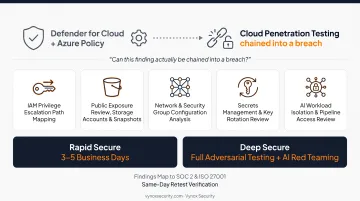
Findings map directly to SOC 2 and ISO 27001 control evidence rather than a generic vulnerability dump. Retests are verified the same day a fix hits staging, so you are not waiting weeks to confirm remediation worked.
Common Azure Security Mistakes to Avoid in 2026
Even mature teams keep making the same high-impact Azure mistakes:
- Default settings left untouched — logging, encryption, and diagnostics often ship partially configured, so gaps can sit unnoticed for months
- Too many standing privileges — excess Global Admins or subscription Owners remain a top tenant risk; use PIM for time-bound activation instead
- Alerts set and forgotten — Defender for Cloud and Azure Policy need ongoing tuning; unreviewed alerts for weeks defeat the point of monitoring
Catching these early—through configuration reviews and cloud security testing—prevents small misconfigurations from becoming breach paths.
Conclusion
Azure security in 2026 depends on disciplined, continuously validated execution of identity, network, encryption, and monitoring fundamentals. New tools help, but they don't replace those basics. Treat this checklist as a living process: reassess it with every sprint, model update, or infrastructure change rather than filing it away as a finished project.
If you want to know whether your Azure environment actually holds up against real attack techniques, Vynox Security offers a free discovery call to scope an assessment against your specific setup.
Frequently Asked Questions
How secure is Azure cloud?
Azure's infrastructure is secure by design, but real-world security depends heavily on how well you configure identity, network, and data controls. Most incidents trace back to customer-side gaps, not platform flaws.
What is Azure cloud security?
Azure cloud security is the combined set of Microsoft's built-in protections and customer-configured controls across identity, data, network, and applications. Both halves matter equally.
What are the four types of cloud security?
As a practical taxonomy: identity and access management, network security, data protection/encryption, and compliance/governance. These aren't an official Microsoft framework, just a useful way to organize your priorities.
What is the Azure shared responsibility model?
The shared responsibility model defines how security ownership divides between Microsoft and the customer depending on whether you're using IaaS, PaaS, or SaaS. Customers always keep responsibility for identities, data, and access controls.
Are Microsoft Defender for Cloud and Sentinel enough on their own?
They detect and flag risks effectively, but they don't confirm whether a finding is actually exploitable or verify that a fix truly closed the gap. That requires independent penetration testing.
How often should Azure environments be tested for vulnerabilities?
Continuously, or at minimum aligned to sprint cycles. Azure configurations change too frequently for annual assessments alone to catch what matters. PTaaS models are built specifically for this cadence.