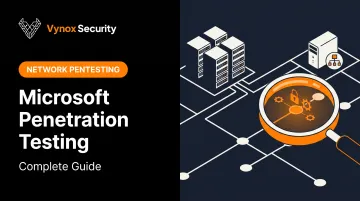
Introduction
Microsoft's ecosystem runs the modern enterprise:
- Azure hosts the infrastructure
- Microsoft 365 handles email and files
- Dynamics 365 powers CRM and ERP workflows
- SharePoint stores the crown-jewel documents
- Copilot sits on top of all of it, with access to nearly everything
That's the problem. Every new layer widens the attack surface.
Many pentest providers treat Microsoft environments like generic cloud infrastructure. They miss Entra ID misconfigurations, broken Conditional Access policies, and over-permissioned service principals — and they often don't know Microsoft's testing Rules of Engagement well enough to test safely or thoroughly.
This guide covers what Microsoft actually allows you to test, a practical testing methodology, the attack surfaces that matter most (including Copilot and Azure OpenAI), and what to look for in a testing partner.
Key Takeaways
- Pentesting hasn't required pre-approval since June 2017, but Cloud Unified Rules of Engagement still apply
- Misconfiguration causes the majority of cloud and SaaS security incidents today
- True coverage tests identity (Entra ID), infrastructure, business apps, and the AI/Copilot layer
- ISV apps and add-ins need annual penetration testing for Microsoft 365 Certification
- Copilot and Azure OpenAI add prompt injection and data-permission risks beyond standard Azure pentests
What Is Microsoft Penetration Testing and Why It Matters
Microsoft penetration testing is authorized, simulated attacks against Microsoft-hosted infrastructure and Microsoft-technology-based applications. That spans Azure, Microsoft 365, Dynamics 365, SharePoint, Power Platform, and increasingly Copilot and Azure OpenAI deployments.
It's not the same as a vulnerability scan. Scanners flag known CVEs and obvious misconfigurations, but they can't chain smaller issues into a real attack path.
Human testers connect the dots a scanner misses, such as:
- Over-permissioned service principals with excessive Graph API scopes
- Weak Conditional Access rules that skip MFA under specific sign-in conditions
- Forgotten guest accounts with lingering admin access
Why Microsoft Environments Are High-Value Targets
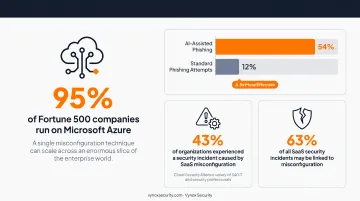
Scale is the reason. Azure is the trusted platform for 95% of Fortune 500 companies, which means a single Azure misconfiguration technique can potentially apply across an enormous slice of the enterprise world.
Misconfiguration isn't a theoretical risk, either. A Cloud Security Alliance survey of 340 IT and security professionals found that 43% of organizations had experienced a security incident caused by SaaS misconfiguration. Misconfigurations may be responsible for up to 63% of all SaaS security incidents.
Attackers are also moving faster. Microsoft's own Digital Defense Report found AI-assisted phishing achieves a 54% click-through rate, compared to just 12% for standard attempts, roughly 4.5 times more effective. AI is compressing the time between reconnaissance and exploitation, which raises the stakes for every AI-connected Microsoft environment.
Understanding Microsoft's Rules of Engagement: What You Can and Cannot Test
Only the resource owner, or a third party with explicit written authorization documented in a service agreement, may test a Microsoft-hosted resource. Microsoft does not grant that authorization on a customer's behalf, ever.
One detail catches teams off guard. Azure resources used purely as a launch point for testing tools, such as attack VMs, still fall under the same Rules of Engagement and subscription terms as the target itself.
Within resources you own or are explicitly authorized to test, permitted activities include:
- Run OWASP Top 10 testing against web applications
- Perform dynamic application security testing (DAST) and fuzz testing
- Conduct port scanning
- Evaluate Conditional Access and Intune MAM policy configurations
- Attempt to break out of AI system or shared-container boundaries, with responsible disclosure of any findings
Microsoft draws hard lines around the following prohibited activities:
- Any DoS or DDoS testing, or excessive-traffic/network-intensive testing
- Accessing tenants, data, or systems you don't own
- Using or retrieving credentials that belong to someone else
- Phishing or social engineering targeting Microsoft services or personnel
- Post-exploit lateral movement or credential dumping against Microsoft's own infrastructure
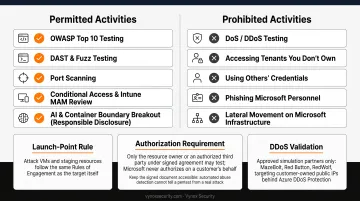
If you need to validate DDoS resilience, don't attempt it live. Microsoft requires this testing to go through approved simulation partners (MazeBolt, Red Button, or RedWolf) targeting customer-owned public IPs protected by Azure DDoS Protection.
One practical tip: keep your signed authorization document accessible during any engagement. Azure's automated abuse detection doesn't know the difference between an authorized pentest and a real attack, and it will flag legitimate activity.
Microsoft Penetration Testing Methodology: A Step-by-Step Approach
Pre-Engagement, Scoping, and Architecture Mapping
Before any testing starts, define:
- In-scope tenants, subscriptions, and resources: be explicit, not broad
- A signed Rules of Engagement document covering authorization and boundaries
- Third-party integration terms for connected tools like GitHub, Power BI, and M365 connectors, since those often fall outside standard scope
With scope locked down, testers move to mapping the environment: Entra tenant → root management group → management groups → subscriptions → resource groups → resources. Entra ID sits underneath all of it as the identity boundary that governs access.
Safe enumeration techniques include:
- Tenant discovery via OpenID configuration endpoints
- Anonymous storage or service discovery through Azure DNS suffixes
- Azure Portal access-control checks to identify who can see what
Exploitation and Attack Simulation
Enumeration reveals what's exposed; exploitation confirms what's actually exploitable. Real engagements chase these specific attack paths:
- Managed identity (MSI) token abuse: requesting tokens through the Instance Metadata Service to borrow another resource's permissions
- Service principal and app registration backdoors: attackers adding their own credentials to maintain persistence
- Privilege escalation via over-permissioned Contributor roles: Contributor can't assign RBAC roles directly, but it often exposes deployment paths or managed identities that lead to full control anyway
- Container registry (ACR/AKS) misconfigurations: anonymous pull access, for instance, exposes an entire registry, not just one repository
Reporting, Remediation, and Retesting
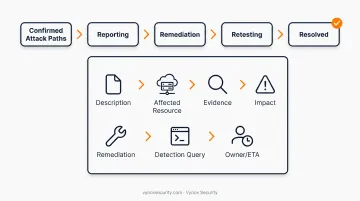
Confirmed attack paths feed directly into reporting. Every finding should follow a consistent structure: Description → Affected Resource → Evidence → Impact → Remediation → Detection Query → Owner/ETA. Retesting then confirms the fix actually closed the gap before the finding gets marked resolved.
Key Attack Surfaces to Test Across the Microsoft Ecosystem
Azure Infrastructure and Identity (Entra ID)
VMs, Storage, Key Vault, and App Service each carry their own exposure risks: public endpoints left open by default, weak network security group rules, and secrets exposed in configuration files. Testing should map every resource against least-privilege baselines and flag any storage account reachable from the public internet.
Identity is usually the bigger problem, though. Excessive privilege assignment and weak Conditional Access policies undermine every other control layered on top, letting a single compromised account bypass network defenses entirely.
Microsoft 365, SharePoint, Dynamics, and Power Platform
A single weak link here can expose data across every connected system. Priority testing areas:
- SharePoint external sharing settings and permission inheritance
- Power Platform connector permissions and Dataverse exposure
- Dynamics 365 CRM/ERP role-based access controls
The AI Layer: Copilot, Azure OpenAI, and Custom LLM Deployments
This is where traditional Azure pentesting runs out of road. Copilot and Azure OpenAI introduce risks that infrastructure-focused testing simply doesn't cover:
- Prompt injection: attackers embed instructions inside documents or emails that Copilot later retrieves and treats as legitimate context
- Over-permissioned Copilot data retrieval: Copilot often inherits broader access than the user actually needs
- Unmonitored automation actions: agentic workflows that can take action without a human checkpoint
- Insecure RAG integrations: retrieval pipelines that don't consistently enforce source-system permissions
This is the layer where Vynox Security focuses. Vynox runs full OWASP LLM Top 10 coverage on every AI engagement, applying 40+ prompt injection and jailbreak techniques, including direct injection, indirect injection through retrieved documents, role-play exploits, multi-turn attack chains, and encoding bypasses. The goal: determine whether system prompts can be extracted or guardrails bypassed.
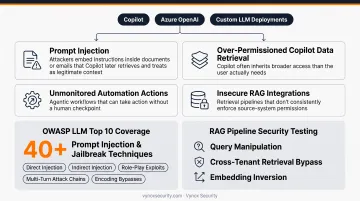
For RAG pipelines connected to enterprise data (the same architecture pattern behind SharePoint- or Dataverse-fed Copilot deployments), Vynox tests query manipulation, cross-tenant retrieval bypass, and embedding inversion. This confirms whether access controls actually hold at the retrieval layer, not just at the source.
Compliance, Certification, and Choosing the Right Testing Partner
If you build an ISV app or Copilot extension for Microsoft 365 Certification, annual penetration testing is a certification requirement, covering both infrastructure and web application layers. Microsoft even offers up to 12 testing days plus 2 retest days as part of that program.
Findings from Microsoft-environment testing don't need to live in a separate silo, either. They can map directly to:
- SOC 2 control evidence (risk analysis, control evaluation, vulnerability monitoring)
- ISO 27001 controls, particularly 8.8 (technical vulnerability management) and 8.29 (security testing)
- ISO 42001 AI management system controls, relevant if the ISV app or Copilot extension itself involves AI/ML components
What to Look for in a Partner
A generic pentest firm checking Azure boxes isn't enough anymore. Look for:
- Microsoft-specific technical depth — not Azure treated as a generic cloud provider
- AI-aware testing capability for Copilot, Azure OpenAI, and agentic workflows
- Fast turnaround with developer-ready remediation guidance, not a PDF full of jargon
- Retest support built into the engagement, not billed as an afterthought
Vynox structures its engagements to fit that bar: 5–15 business day delivery, compliance-ready evidence packs mapped directly to SOC 2 and ISO 27001, and same-day retest verification once a fix reaches staging. This is the combination of speed and compliance mapping Microsoft-ecosystem clients should expect from any testing partner.
Frequently Asked Questions
What is the primary goal of penetration testing in Microsoft Azure?
The goal is finding exploitable misconfigurations, excessive permissions, and identity weaknesses before real attackers do. It also validates whether your detection and monitoring controls actually catch the activity.
Is Microsoft Defender a SIEM tool?
No. Microsoft Defender is an XDR and endpoint threat protection suite. Microsoft Sentinel is the actual cloud-native SIEM, though the two integrate tightly for unified investigation.
Do you need Microsoft's approval before penetration testing Azure resources?
No, pre-approval hasn't been required since June 2017. You still must comply with the Cloud Unified Penetration Testing Rules of Engagement at all times.
How often should Microsoft environments be penetration tested?
At minimum, once a year, aligned with M365 Certification requirements. Test again after major architecture changes or new AI feature rollouts, and always ahead of compliance audits.
Can penetration testing cover Microsoft Copilot and AI-powered features?
Yes. Specialized AI-native testing covers prompt injection and data leakage through over-permissioned Copilot access, plus insecure agent or plugin integrations that traditional Azure pentests don't address.
How much does Microsoft penetration testing typically cost?
Cost depends on scope (a single application versus a full tenant assessment) and depth of testing required. Modern providers offer transparent, stage-appropriate pricing rather than a one-size-fits-all quote.