Verizon's 2026 Data Breach Investigations Report found that 31% of breaches now start with software vulnerabilities. The report doesn't specify how many of those flaws sat unpatched inside the network for months, but the pattern is familiar to anyone who's worked an incident: the vulnerability was already there, waiting.
Many organizations struggle with this exact blind spot. They harden the front door and forget the hallways behind it. This article breaks down what internal vulnerability scanning actually is, how it works, how it differs from external scanning, and what compliance frameworks expect from it.
Key Takeaways
- Internal scanning checks systems from inside the network, catching gaps external scans never see
- Assumes attackers or compromised systems are already inside, with no trust based on network location
- Credentialed scans dig far deeper than unauthenticated ones, revealing missing patches and config errors
- PCI DSS, HIPAA, SOC 2, and ISO 27001 all require regular internal vulnerability assessment
- Scans catch known flaws fast, but pairing them with penetration testing closes the gaps automation misses
What Is Internal Vulnerability Scanning?
Internal vulnerability scanning identifies security weaknesses in an organization's internal network (servers, workstations, databases, internal cloud resources) from the vantage point of someone who's already inside the perimeter. Rather than testing whether an outsider can break in, it finds what an attacker can reach once they are already inside.
That distinction matters because of the Zero Trust principle NIST laid out in SP 800-207: network location alone grants no implicit trust. A device on the internal LAN isn't safe just because it sits behind the firewall.
Perimeter defenses fail eventually. Internal scanning assumes that will happen, instead of hoping it never does.
Two Core Scanning Methods
Internal scans generally fall into two categories:
- Unauthenticated scans — probe the network from a logged-out perspective, checking open ports, reachable services, and visible banners without credentials
- Authenticated (credentialed) scans — log in with trusted credentials to inspect patch levels, registry settings, installed software, and configuration details that aren't visible externally
Credentialed scans consistently surface more issues because they see what's actually installed, not just what's exposed on the wire.
What These Scans Actually Uncover
Internal scans typically flag:
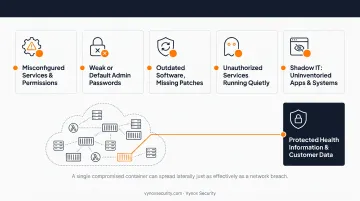
- Misconfigured services and permissions
- Weak or default administrative passwords
- Outdated software missing critical patches
- Unauthorized or forgotten services running quietly
- Shadow IT: apps and systems nobody inventoried
The cloud complicates this. In containerized and serverless environments, "internal" is a fuzzier concept. A single compromised container can spread laterally just as effectively as a breach on a traditional network, which is why organizations can't rely on network topology alone to define scope.
This matters most for organizations holding sensitive patient or customer records. If an attacker gets a foothold, the real danger is not the initial entry: it is whether they can move laterally toward the data that matters. Healthcare and SaaS platforms, in particular, need to contain that movement before it reaches protected health information or customer data.
How Internal Vulnerability Scanning Works
Internal scanning follows a consistent sequence, whether it's a monthly job or a continuous pipeline.
Discovery
The scanner first maps the environment: active devices, running services, operating systems, and internal assets. You can't assess what you haven't found, and this step often surfaces forgotten servers or test environments nobody remembered to decommission.
Detection
The scanner checks discovered assets against a database of known vulnerability signatures (CVEs). Credentialed scans go deeper, auditing patch levels and configuration settings on the host rather than only what is visible over the network.
Risk Scoring and Prioritization
Not every finding deserves the same urgency. CISA's Known Exploited Vulnerabilities catalog is the authoritative source for flaws already being exploited in the wild, so teams shouldn't rank purely by raw CVSS severity. A medium-severity flaw actively exploited by ransomware groups deserves faster attention than a critical-rated bug with no known exploit.
Cadence and Scheduling
Recommended frequency depends heavily on environment:
| Environment | Typical Cadence |
|---|---|
| PCI DSS in-scope systems | At least quarterly (Requirement 11.3.1) |
| Dynamic cloud workloads | Continuous or near-continuous |
| Standard on-prem networks | Monthly to quarterly |
| Post-incident or post-change | Immediately, event-triggered |
NIST's RA-5 control reinforces this: use an organization-defined frequency, but also scan whenever a newly reported vulnerability could plausibly affect the system. Waiting for the next quarterly cycle when a fresh zero-day drops isn't good enough.
Reporting and Remediation
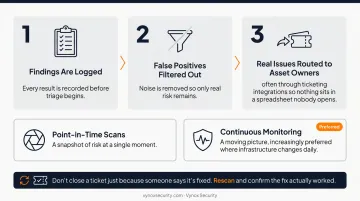
Findings are logged, false positives filtered out, and real issues routed to asset owners—often through ticketing integrations so nothing sits in a spreadsheet nobody opens. Point-in-time scans give a snapshot; continuous monitoring gives a moving picture, which is increasingly preferred where infrastructure changes daily.
One rule stands out: don't close a ticket just because someone says it's fixed. Rescan and confirm the fix actually worked.
Internal vs. External Vulnerability Scanning
The difference comes down to where the scanner sits and what it's simulating.
External scans simulate an outside attacker probing internet-facing assets — firewalls, web servers, VPN endpoints. Internal scans simulate someone (or something) that already has network access, whether that's a malicious insider, a stolen credential, or malware that slipped past the front door.
| Dimension | Internal Scan | External Scan |
|---|---|---|
| Perspective | Inside the network | Outside, over the internet |
| Target assets | Internal hosts, private services, workstations | Internet-facing servers, firewalls, VPNs |
| Threat model | Compromised account, insider, lateral movement | Untrusted external actor before initial access |
| Common findings | Missing patches, misconfigs, weak internal creds | Exposed ports, outdated public services |
| Typical frequency | Quarterly minimum (PCI DSS); continuous for cloud | Quarterly (PCI DSS ASV requirement) |
Both are necessary, but they serve different purposes. External scans are often compliance-driven: PCI DSS Requirement 11.3.2 requires passing scans from an Approved Scanning Vendor.
Internal scans answer a different question: whether your segmentation controls actually stop lateral movement, or whether they exist mostly on paper.
In cloud environments, the line blurs further. A workload can be "internal" to your VPC yet still exposed through a misconfigured API gateway. That is why assessing both perspectives together beats relying on network location alone.
Types of Vulnerability Scans
Internal scanning uses several techniques together, not a single method:
- Network scans — discover live hosts, open ports, and reachable services across the network
- Host-based scans — run locally or with credentials on individual machines to catch missing patches and OS-level misconfigurations
- Application scans — target web and software layers for injection flaws, broken authentication, and similar weaknesses
- Database scans — check for exposed credentials, excessive permissions, and unpatched database engines
Across every type, credentialed vs. non-credentialed access sets how deep the scan can go. A host-based scan run internally with credentials, for example, stacks two dimensions: scan target and authentication depth.
Organizations rarely get full coverage from one scan type. Network scans can miss application-layer flaws; application scans won't catch an unpatched OS. You need the combination to cover hosts, apps, and data stores in one pass.
Benefits, Compliance Requirements & Best Practices
The core benefit of internal scanning is defense-in-depth. Perimeter defenses eventually get bypassed. Internal scanning is what catches the attacker, the compromised credential, or the shadow IT server once they're already inside.
What Compliance Frameworks Actually Require
| Framework | Specific requirement |
|---|---|
| PCI DSS 4.0 | Requirement 11.3.1 mandates internal vulnerability scans at least quarterly |
| HIPAA Security Rule | Requires ongoing risk analysis of ePHI, typically satisfied through vulnerability management (no fixed frequency specified) |
| ISO 27001:2022 | Control 8.8 requires obtaining vulnerability information, evaluating exposure, and taking appropriate action |
| SOC 2 | CC7.1 requires detection and monitoring procedures to identify newly discovered vulnerabilities |
Notice that only PCI DSS specifies a hard number. The others require an ongoing program — which is exactly where organizations trip up, treating vulnerability management as a once-a-year checkbox instead of a continuous discipline.
Implementation Best Practices
- Prioritize authenticated scans — they surface far more accurate, actionable findings than unauthenticated probes
- Assign clear asset ownership — a finding with no owner is a finding that never gets fixed
- Automate remediation workflows — route findings into existing ticketing systems rather than manual spreadsheets
- Schedule around maintenance windows — avoid disrupting production, especially for credentialed scans that touch live systems
Where Scanning Hits Its Ceiling
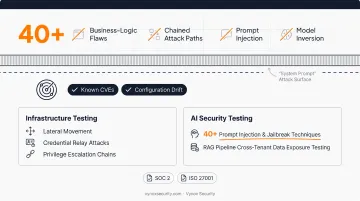
Automated scanning is fast and consistent, but it's built to catch known CVEs and configuration drift. It won't find business-logic flaws, chained attack paths, or how a set of individually minor weaknesses combine into a full compromise.
It also has zero visibility into AI-specific risks like prompt injection or model inversion. A CVE scanner has no concept of "system prompt" as an attack surface.
This is why organizations preparing for SOC 2 or ISO 27001 audits typically pair internal scanning with manual penetration testing. Vynox Security, for instance, runs infrastructure testing that targets lateral movement, credential relay attacks, and privilege escalation chains toward high-value systems—the exact gaps automated scans leave open.
For teams shipping AI products, Vynox's AI security testing layer runs 40-plus prompt injection and jailbreak techniques and tests RAG pipelines for cross-tenant data exposure. Traditional scanners aren't built to detect any of that.
The output includes developer-ready remediation guidance with reproduction steps and stack-specific fixes. An evidence pack maps findings directly to SOC 2 and ISO 27001 control requirements, so the pentest doubles as audit-ready proof rather than a separate compliance exercise.
Frequently Asked Questions
What is an internal vulnerability scan?
It's an assessment conducted from inside the network to find weaknesses invisible to external scans, such as missing patches, weak internal credentials, or misconfigured services on internal hosts.
What is the difference between internal and external vulnerability scans?
Internal scans assume an attacker or insider already has network access; external scans simulate an outsider probing internet-facing assets from the outside in. Both matter, but they answer different questions.
What are the different types of vulnerability scans?
The main categories are network, host-based, application, and database scans, plus the credentialed versus non-credentialed distinction that applies across all of them.
How often should internal vulnerability scans be performed?
PCI DSS requires quarterly internal scans at minimum; many frameworks expect a similar baseline. Dynamic cloud workloads and frequent releases generally warrant continuous or near-continuous scanning.
Is internal vulnerability scanning the same as penetration testing?
No. Scanning is automated and finds known vulnerabilities; penetration testing involves manual exploitation to uncover business-logic flaws and real attack paths that scanners simply can't see.
What tools are used to perform internal vulnerability scans?
Organizations typically use agent-based scanners on hosts or agentless/API-based tools that pull inventory remotely, for authenticated and unauthenticated coverage across on-prem and cloud. Scanning is often paired with manual penetration testing to validate which findings are truly exploitable.